As an Amazon Associate I earn from qualifying purchases. This article contains affiliate links, which means I may earn a small commission if you buy through them, at no extra cost to you. Read the full affiliate disclosure.
A bright screen in a dark room is a recipe for tired eyes and a washed out picture. Bias lighting fixes both problems with one simple trick: a soft glow behind your TV or monitor that lifts the contrast, eases eye strain, and makes the whole room feel finished. It is one of the cheapest upgrades you can make to a setup, and once you try it, going back to a bare black wall feels wrong. If you love the glow in general, my roundup of 15 LED gaming room ideas that set the perfect mood has even more ways to light a room. Below are seven complete bias lighting setups, from a warm living room TV to a dark gaming corner, each one ready to copy.
In this article
At a glance
| Setup | Best for | Hero product |
|---|---|---|
| Warm TV Glow | Movie nights in the living room | Philips Hue Play Gradient Light Strip |
| Dual Monitor Halo | Work and gaming at one desk | Govee RGBIC LED Strip Lights |
| Console Light Bars | Console players who want color sync | Philips Hue Play Light Bar, 2 Pack |
| Budget Bedroom Strip | A big glow on a small budget | Govee 65.6ft RGBIC LED Strip Lights |
| Ultrawide Light Bar | Clean, focused desk work | Hive Vibes Monitor Light Bar |
| Small Desk Panels | Tiny bedrooms and small desks | Nanoleaf Shapes Triangles |
| Dark Gaming Corner | A moody late night battlestation | Nanoleaf Shapes Ultra Black Triangles |
1. Warm TV Glow for Movie Nights
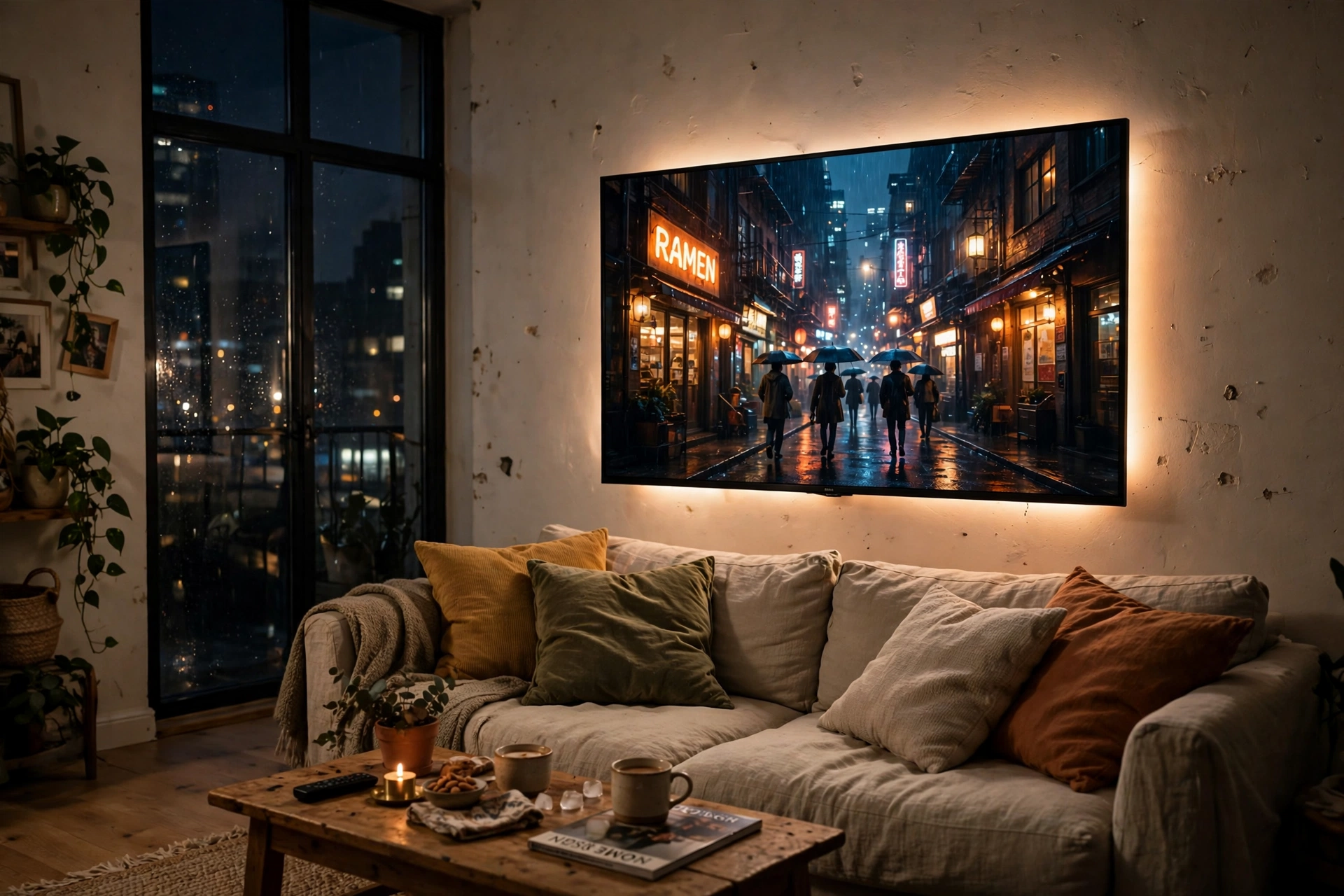
This is the classic bias lighting setup, and it works because it is so simple. A warm white strip runs around the back of the TV, throwing a soft halo onto the wall. The screen stops feeling like a bright hole in a dark room, and the picture itself looks richer because your eyes are no longer straining against the contrast.
- Keep it warm: a warm white glow (around 2700K to 3000K) suits movie nights better than cool blue, which can feel clinical.
- Leave a gap: the strip sits a few inches in from the TV edge so the light spreads evenly instead of showing hard lines.
- Add a floor lamp: a corner lamp picks up the same warm tone and pulls the glow across the whole room.
Why warm white wins here: it matches the lamps and candles already in a living room, so the TV glow feels like part of the room instead of a gadget stuck on the wall.
Philips Hue Play Gradient Light Strip, 55 Inch
This strip blends several colors along its length, so the glow behind the TV can shift with the scene on screen instead of sitting on one flat color.
Why this one: the gradient effect looks far more natural than a single color strip, and it pairs with the Hue app for easy dimming.
Worth knowing: it works best with a Hue Bridge for the full sync features, which is an extra purchase if you do not own one yet.
Govee RGBIC Floor Lamp, LED Corner Lamp
A slim corner lamp that stands in the dark corner beside the sofa and washes the wall with the same warm tone as the TV strip.
Why this one: it fills the far corner so the TV is not the only light source, and the app control makes it easy to match the strip color.
Worth knowing: it needs a power outlet in the corner, so check your socket placement before you commit to a spot.
Keep a small desk at the side of the room for a laptop, a storage basket under it for remotes and controllers, and a comfortable chair facing the TV, so the whole setup is ready for a long movie night.
2. Dual Monitor Halo for Work and Play
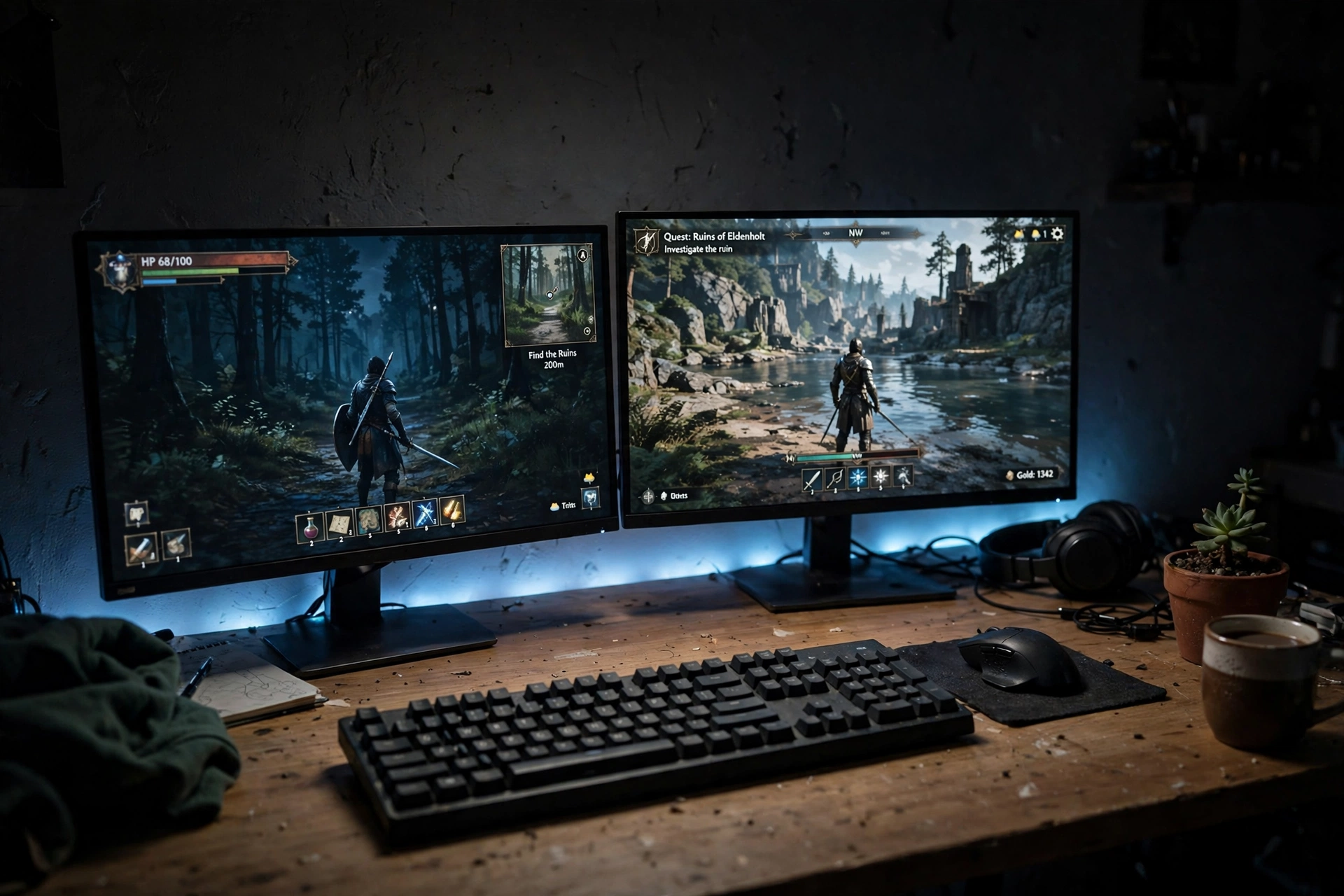
Two monitors double the bright surface in front of you, which is exactly why a strip behind them helps so much. A single LED strip run along the back edge of the desk and up behind both screens creates one continuous halo, so the wall behind your work glows gently instead of sitting pitch black. Add a monitor light bar on top and you get light on the desk too, without any glare on the screens. The setup below is a full desk: monitors, keyboard, mouse, a plant for softness, and cables tucked out of sight.
- Measure first: run the strip along the back of the desk and behind both monitors, leaving a little slack at the corners.
- Pick one color for work: a soft blue or neutral white keeps the mood calm during long sessions.
- Switch for games: flip to a warmer or more vivid color when you stop working and start playing.
- Hide the power brick: tuck it behind the desk leg so the clean look survives.
Govee RGBIC LED Strip Lights, 16.4ft
A flexible strip that shows several colors at once along its length, long enough to frame two monitors and the desk edge behind them.
Why this one: the RGBIC segments let you run a gentle gradient behind the monitors instead of one flat color, and the app has plenty of preset scenes.
Worth knowing: the adhesive can struggle on dusty or textured walls, so wipe the surface clean before you stick it down.
Quntis Monitor Light Bar RGB PRO
A slim bar that clips on top of a monitor and lights the desk in front of you, with an RGB glow on the back that adds to the halo on the wall.
Why this one: it lights your keyboard and notes without shining into your eyes or reflecting on the screen, which a desk lamp cannot do.
Worth knowing: very thick or curved monitor bezels can make the clip sit unevenly, so check your monitor thickness first.
Pull up a comfortable chair with good back support, and keep a small storage drawer beside the desk for cables and notebooks, so long work and play sessions stay tidy.
3. Console Light Bars That Match the Game
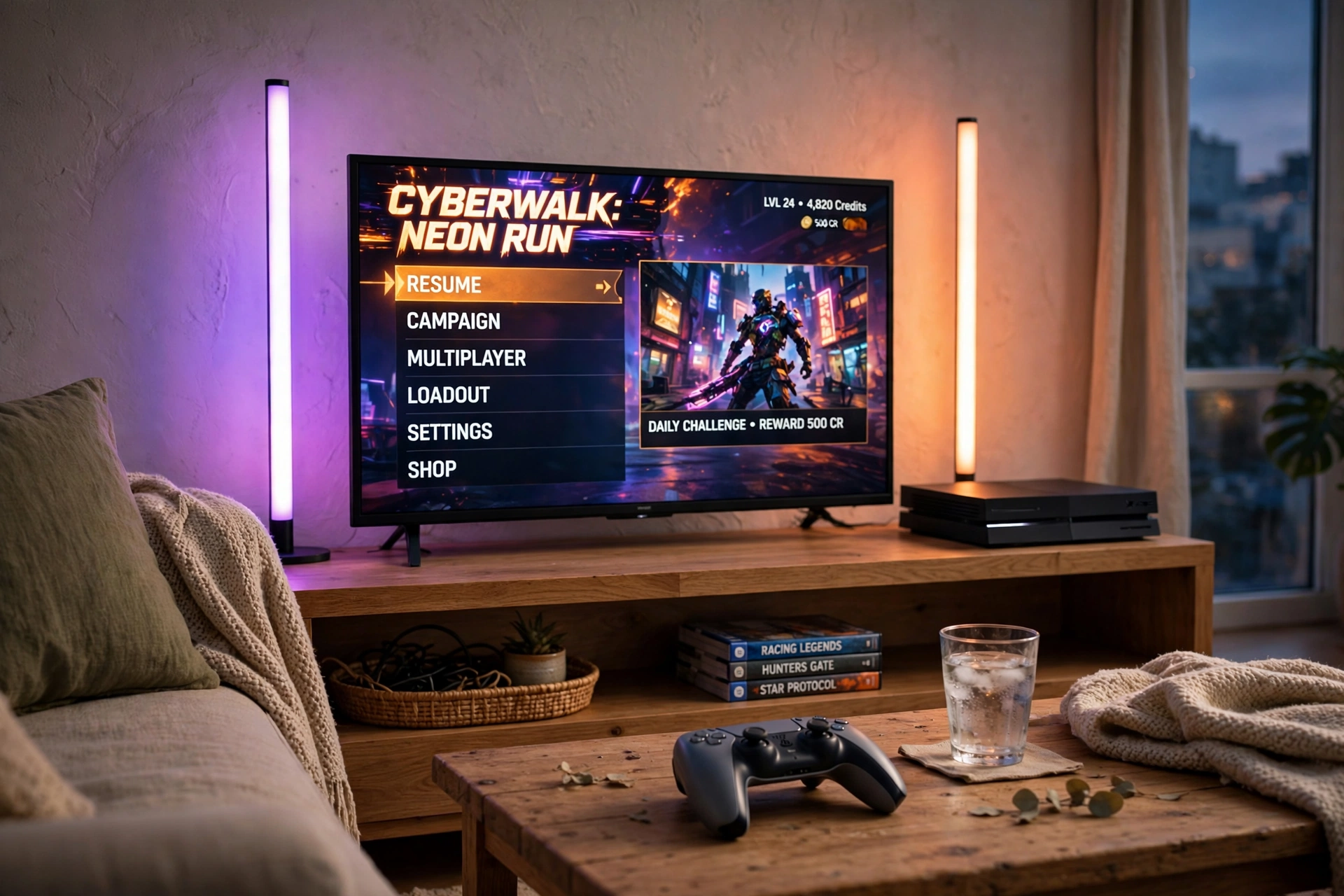
Light bars are the easiest bias lighting to set up because there is nothing to stick and nothing to peel off. You stand two bars behind the TV, angle them at the wall, and the room fills with color. When the bars can sync with what is on screen, the glow shifts with the game, purple in a menu, orange in a desert level, which makes the TV feel bigger than it is. Keep the media console low and tidy, leave the bars a little space from the wall, and let the controller rest on the coffee table where it belongs.
Quick tip: point the bars slightly outward, not straight at the wall. The wider spread softens the color and stops bright hotspots from forming behind the TV.
Philips Hue Play Light Bar, 2 Pack
Two compact bars that can stand upright, lie flat, or mount behind a TV, and sync with on-screen colors through the Hue system.
Why this one: the color sync is the real draw, and the bars are small enough to hide behind almost any TV.
Worth knowing: full screen sync needs a Hue Bridge and the Hue Sync app or box, so budget for that if you want the full effect.
Govee Glide Wall Lights, 2 Panels Set
Two slim wall bars that mount beside the TV and paint the wall with smooth flowing color, controlled from the Govee app.
Why this one: they double as wall decor when the TV is off, and the flowing color effects look great in a game room.
Worth knowing: they mount with adhesive, so they are best on smooth painted walls rather than textured wallpaper.
Sit in a supportive chair, plug the bars and the TV into a power strip behind the stand, and keep a small storage basket nearby for controllers, so the console corner stays neat.
4. Budget Bedroom Strip That Covers the Whole Wall
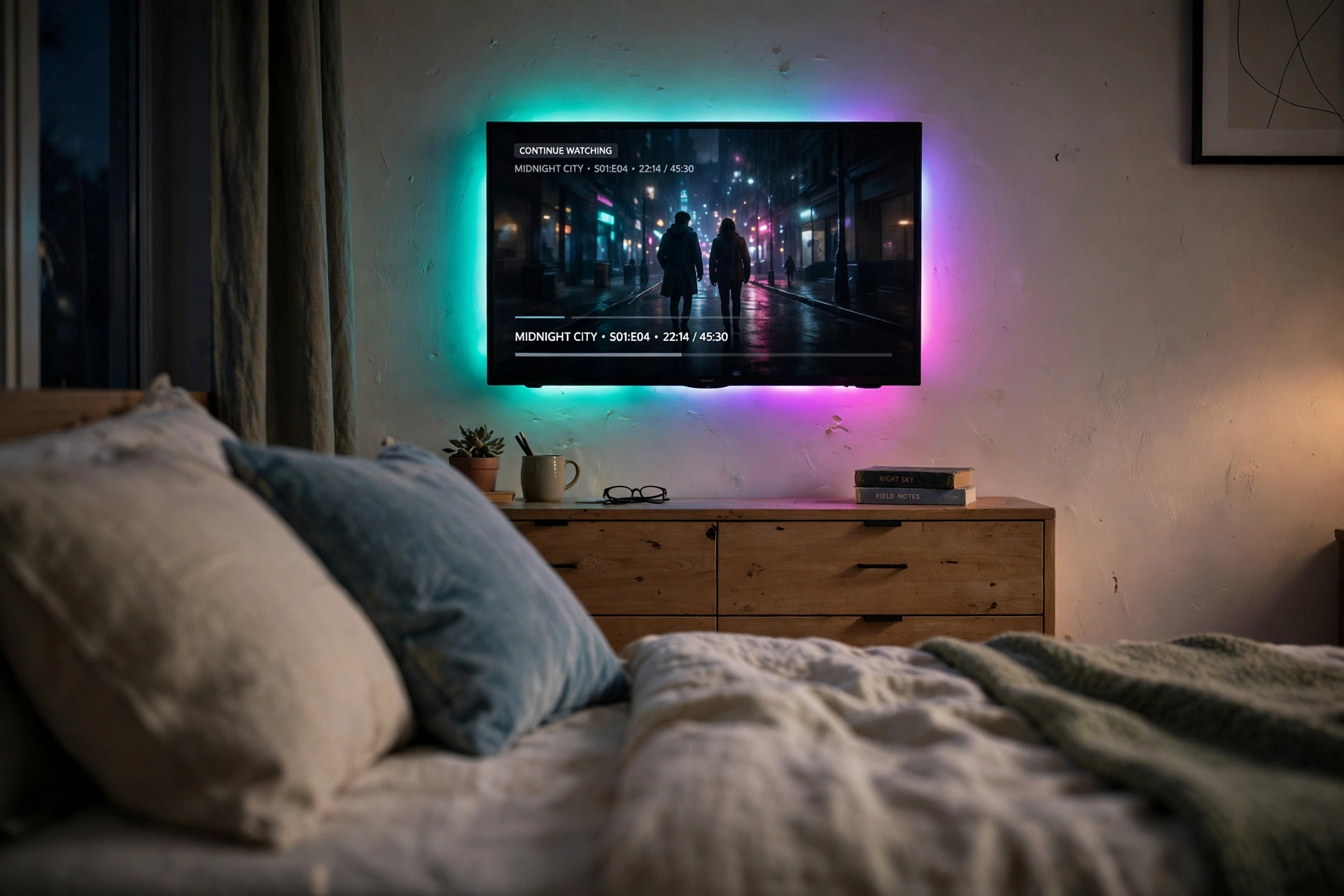
You do not need a big budget to get a big glow. A long, affordable strip can run behind the TV, along the top of the dresser, and even around the headboard, so the whole bedroom gets the same soft color. The trick is choosing one color scheme for the room instead of letting every light fight for attention. In this setup, teal and magenta behind the TV pair with a matching wall light set, and the bed stays the calm center of the room. It is the kind of setup that costs little, takes an evening to install, and changes how the room feels every night.
One long strip
Cheaper per foot, one plug, one app. Best when the TV and the furniture sit on the same wall.
Two short strips
More flexible if the TV and the bed are on different walls, but you juggle two plugs and two controls.
Govee 65.6ft RGBIC LED Strip Lights
A very long strip that covers a TV, a dresser, and a headboard in one run, with segments that can show different colors at the same time.
Why this one: the length is the value here, one purchase covers the whole wall, and the app scenes make it easy to change the mood.
Worth knowing: measure your wall before ordering, because cutting a strip short wastes length you cannot get back.
Govee Glide Wall Light, 6 Pcs + 1 Corner
Six slim wall bars plus a corner piece that you can arrange in a line or a shape beside the TV, all glowing in flowing color.
Why this one: the set is flexible enough to fit an awkward wall, and it looks like intentional decor rather than an afterthought.
Worth knowing: plan the layout on the floor first, because repositioning the adhesive mounts can weaken the stick.
Set the strip behind the TV above a simple desk, sit in a comfortable chair, and keep a storage drawer nearby for controllers and spare cables, so the bedroom setup works for play and rest.
5. Ultrawide Light Bar for a Clean Desk
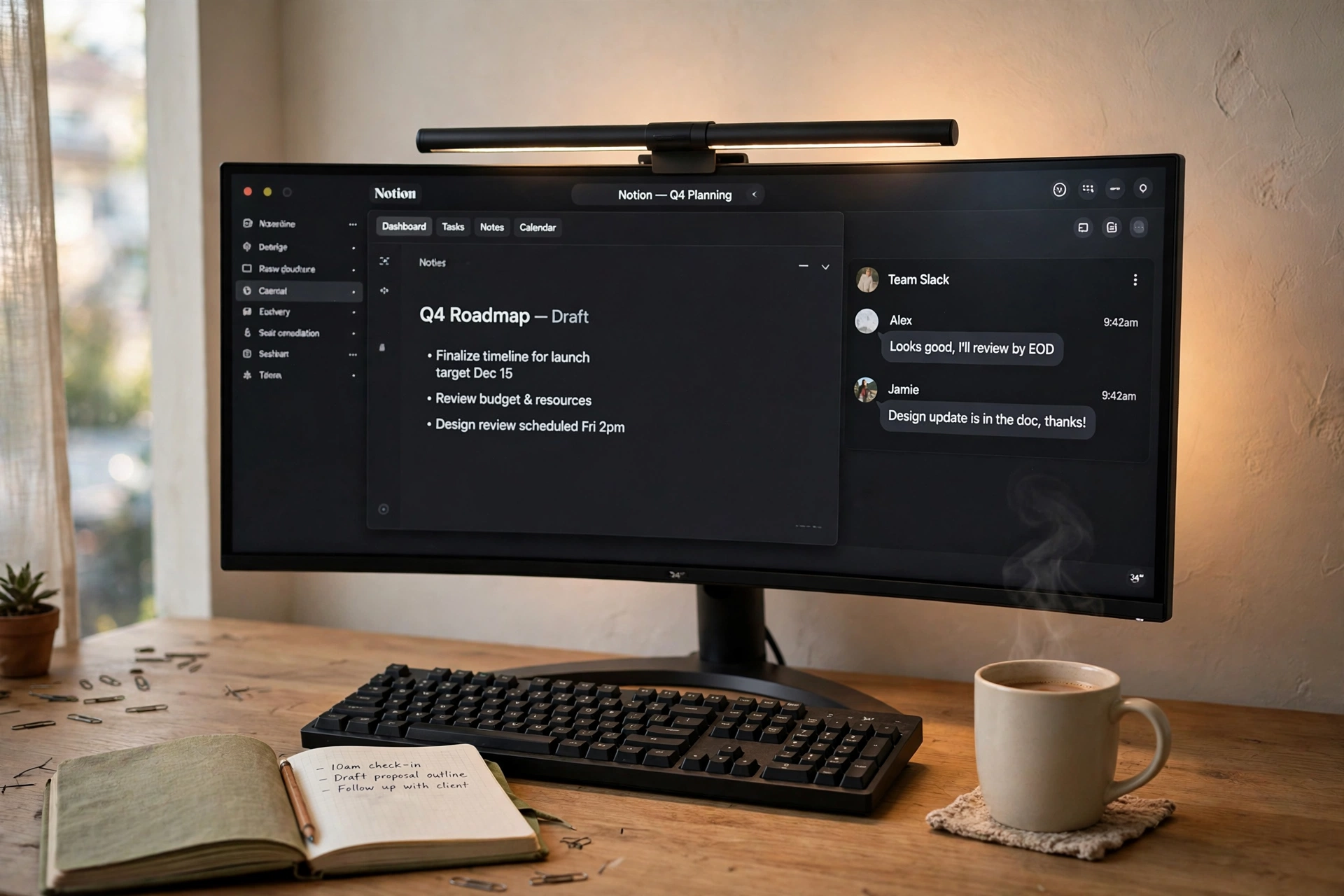
An ultrawide monitor is already a lot of screen, so the lighting around it should stay calm. A monitor light bar does two jobs at once: it washes the desk with warm light for your keyboard and notebook, and its rear glow puts a soft halo on the wall behind the screen. There is no strip to stick, no glare, and nothing cluttering the desk. A wooden desk, a mug of coffee, and a notebook finish the scene, and the whole setup feels like a proper workspace rather than a light show.
What works here
The bar: sits on top of the monitor, angled down, so light lands on the desk and never on the screen.
The screen: a wide curved display fills your view, so the wall glow only needs to be gentle.
The desk: wood tones and a warm light temperature keep the setup feeling calm and focused.
The extras: one notebook and one mug, nothing more, so the light bar stays the star.
Hive Vibes Monitor Light Bar with RGB Backlight
A monitor light bar with a warm front light for the desk and an RGB backlight that glows onto the wall behind the screen.
Why this one: it covers both directions of bias lighting in a single bar, and the RGB back can match your room color.
Worth knowing: the bar is powered by USB, so keep a free port on your monitor or PC for it.
LG 34 Inch Curved UltraWide QHD Monitor, 160Hz
A 34 inch curved ultrawide display that replaces two monitors with one wide screen, with a fast refresh rate for gaming.
Why this one: the curve wraps the screen around your view nicely, and the wide format is great for both work and games.
Worth knowing: it takes up a good amount of desk depth, so measure your desk before you buy.
Sit in a comfortable chair with good back support, and keep a storage basket beside the desk for notebooks and chargers, so the clean desk stays clear.
6. Small Desk Panels for a Tiny Bedroom
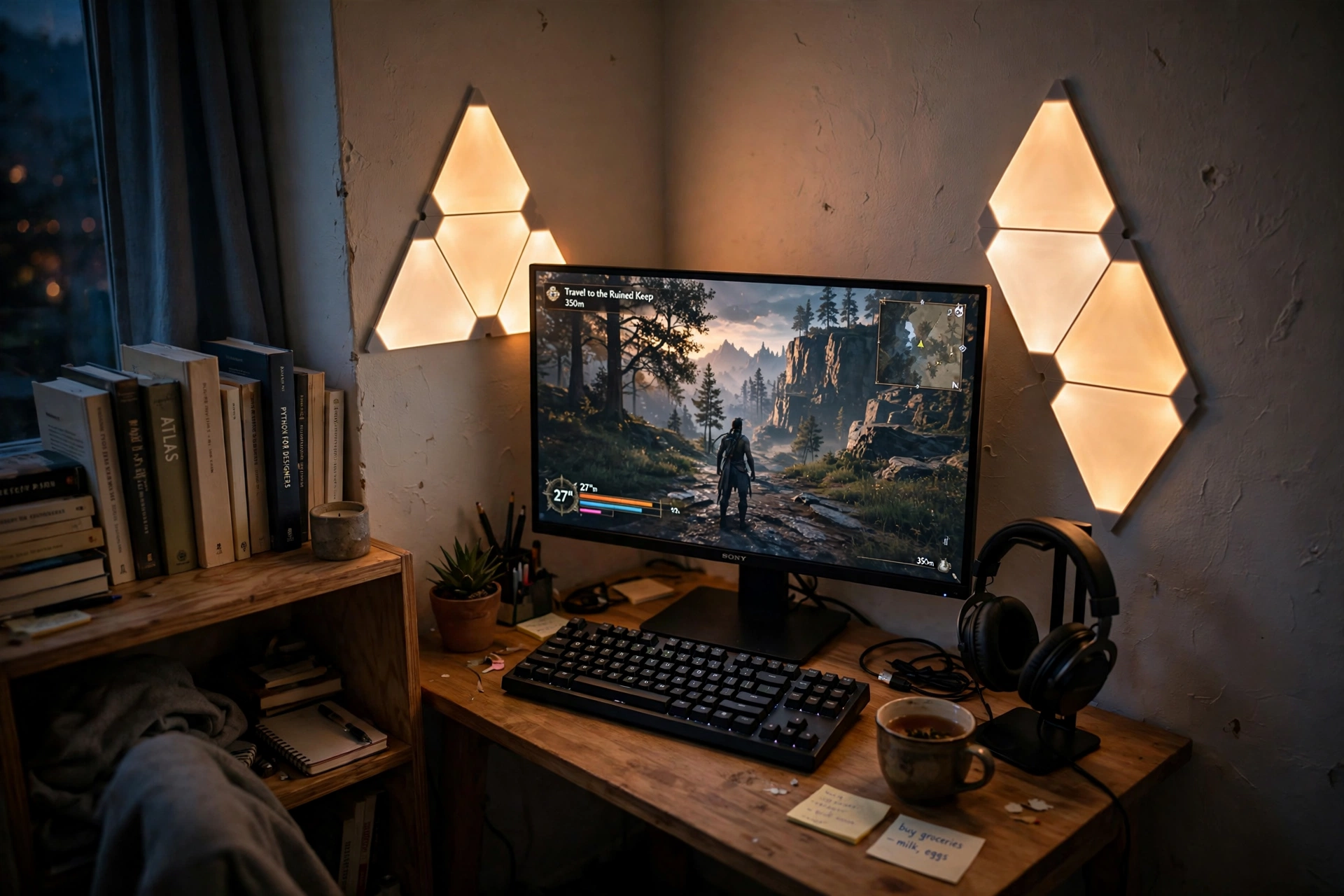
Small rooms need lighting that earns its wall space. Triangular wall panels do that: they glow softly beside the monitor, they act as bias lighting by lifting the wall brightness around the screen, and they look like art when the monitor is off. In a small bedroom desk setup, a few amber panels next to a 27 inch monitor, a compact keyboard, and headphones on a stand are all you need. The room stays tidy because the light lives on the wall, not on the desk.
Small desk checklist
✓ Panels mounted at eye level beside the monitor, not above it
✓ One warm color for evenings, so the small room feels cozy
✓ Headphones on a stand to keep the desk surface clear
✓ Cables routed behind the desk, out of the glow
Nanoleaf Shapes Triangles Smarter Kit
Modular triangle light panels that link together in any shape and glow in millions of colors, controlled by touch, app, or voice.
Why this one: the panels are both bias lighting and wall art, which matters when wall space is tight.
Worth knowing: the starter kit covers a modest area, so you may want an expansion pack for a bigger wall design.
Acer Nitro KG271U 27 Inch QHD Gaming Monitor, 180Hz
A 27 inch QHD gaming monitor with a fast 180Hz refresh rate, sized right for a small desk without crowding it.
Why this one: QHD looks sharp at 27 inches and the high refresh rate keeps games smooth, all at a friendly size for a bedroom desk.
Worth knowing: the included stand is basic, so a monitor arm helps if you want more desk space back.
Sit in a comfortable chair with good back support, and keep a small storage tray on the desk for headphones and cables, so the tiny bedroom setup stays tidy.
7. Dark Gaming Corner with a Deep Blue Glow
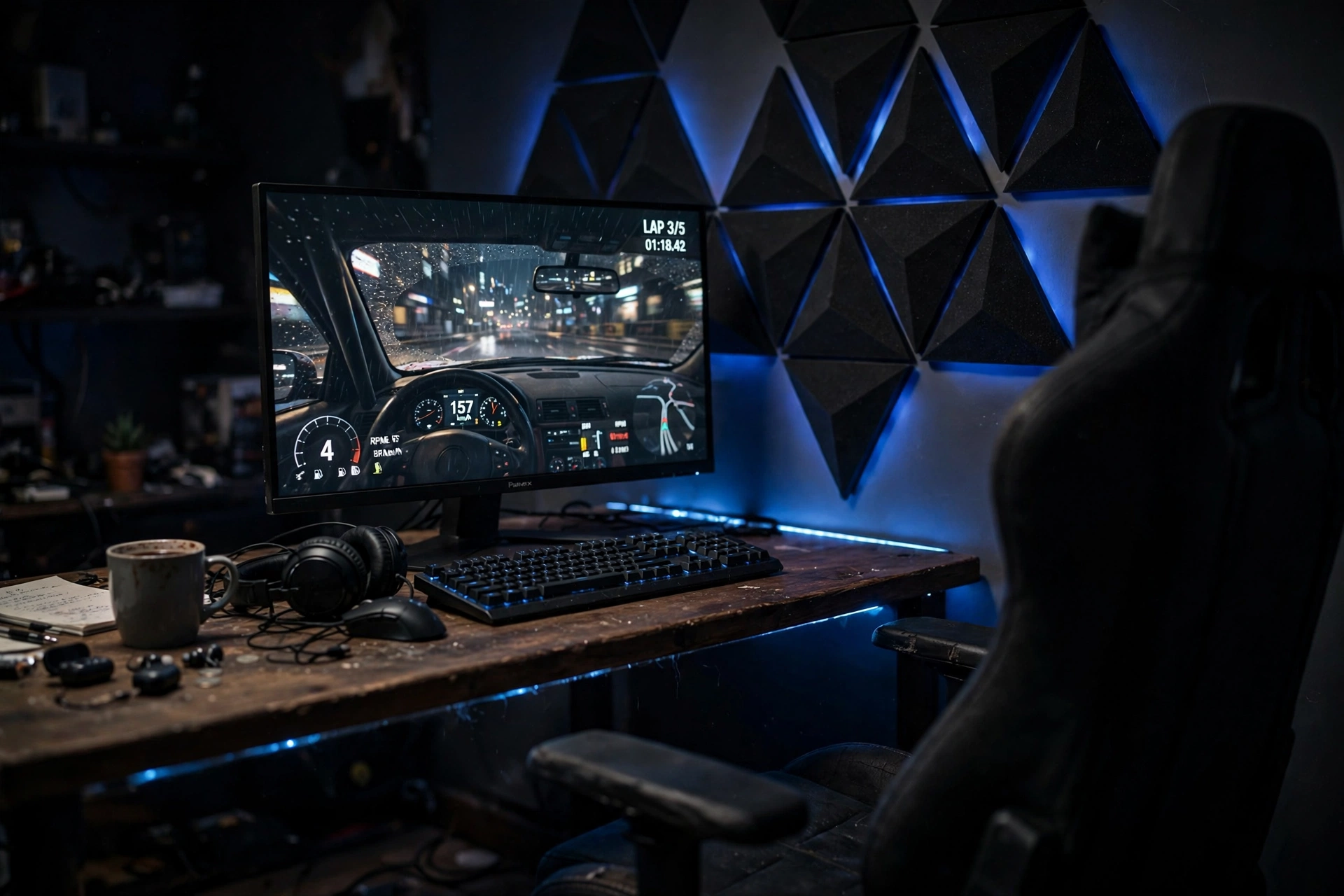
Some setups are meant for the dark. A black desk, black wall panels, and a deep blue glow make the screen the brightest thing in the room, but the bias light keeps it from being harsh. The blue halo behind the monitor softens the edges of the screen and gives the corner a moody, cinematic feel that suits late night racing games perfectly. If you love this look, take a peek at 15 dark gaming setup ideas for a moody battlestation for more ways to build a dark room that still feels comfortable.
Common mistake: going fully black with no glow at all. A screen in a pitch black room is the fastest way to get a headache, so keep at least a gentle halo behind the monitor, even in the darkest setup.
Nanoleaf Shapes Ultra Black Triangles Smarter Kit, 15 Pack
Black triangle light panels that blend into a dark wall when off and glow in rich color when on, with 15 panels for a bold design.
Why this one: the black finish disappears into a dark room, so the glow looks like it comes from nowhere, which is exactly the moody effect you want.
Worth knowing: the black panels show dust more easily than white ones, so a quick wipe now and then keeps them looking sharp.
Samsung 27 Inch Odyssey G5 QHD Gaming Monitor
A 27 inch QHD gaming monitor with a curved screen that pulls you into the game, a good match for a dark corner setup.
Why this one: the curve and QHD resolution make games feel immersive, and the slim bezels keep the focus on the screen.
Worth knowing: the stand offers limited height adjustment, so you may want to set the desk and chair height to match.
Plug the panels and the monitor into a power strip behind the desk, and keep a small storage basket nearby for controllers, so the dark corner stays neat and safe.
Bias lighting FAQ
Does bias lighting really reduce eye strain?
Yes, for most people it helps. A soft glow behind the screen reduces the contrast between the bright display and a dark room, so your eyes do not work as hard when you look away from the screen and back. It is not a cure for all eye strain, and you should still take breaks, but it makes long sessions noticeably more comfortable.
What color is best for bias lighting?
For color accuracy, a neutral white around 6500K is the standard, because it matches daylight and does not tint what you see on screen. For mood and movie nights, warm white or a soft color you enjoy is fine. The honest answer is that the best color is the one you will actually leave on.
How do I stick a strip behind a TV or monitor?
Clean the back edge with a dry cloth first, then press the strip on a few inches in from the edge so the glow spreads evenly. Most strips use adhesive tape, and a few small clips at the corners stop it from peeling over time. If you rent, test the adhesive on a hidden spot first.
Do I need a smart hub for bias lighting?
No. Most strips and light bars work fine with a remote or a phone app on their own. A hub only matters if you want the lights to sync with the colors on your screen or to join a wider smart home setup. Start simple and add a hub later if you catch the bug.
Will bias lighting work on a curved monitor?
Yes, with the right product. Flexible LED strips follow a curve easily, and a monitor light bar works on any screen shape because it clips on top. Rigid light bars are the one type to check, since they sit best behind flat screens.
How much does a bias lighting setup cost?
A basic strip setup usually costs about the same as a takeaway dinner for two, while a color syncing system with a hub can cost several times more. Start with a simple strip or a light bar, live with it for a few weeks, and only spend more if you know you want the syncing features.
Conclusion
Bias lighting is one of those upgrades that sounds too simple to matter until you try it. Pick the setup that matches your room, stick a strip behind the screen or set a bar on top of the monitor, and give it one evening. Your eyes will feel the difference, the picture will look better, and the room will feel finished in a way it did not before. Then you can play with color, add a lamp, or sync it all to the game, one step at a time.
Related reading
15 gaming desk setup ideas for small rooms if your desk is tight on space.
