As an Amazon Associate I earn from qualifying purchases. Read our full affiliate disclosure for more detail.
Your backdrop is the first thing viewers see when you go live, and it sets the whole mood before you say a word. A blank wall reads as unfinished, while a backdrop with intention tells people you take your stream seriously. The good news is that you do not need a full room makeover to get there. A few well chosen pieces behind your desk can turn a plain corner into a scene worth watching.
In this guide you will find 8 complete streaming backdrops you can copy whole, from glowing LED panel walls to a calm white minimal look. Each one covers the desk, screens, light, and the wall behind it, so nothing feels half done. If you want more ways to light the room around your backdrop, the ideas in 15 LED Gaming Room Ideas That Set the Perfect Mood pair well with every setup below.
In this article
At a glance
1. Hexagon LED Panel Wall
2. Neon Sign Glow Wall
3. LED Strip Curtain Wall
4. Glowing PC Case Backdrop
5. Corner Lamp Warm Glow
6. Dark Moody Bias Light
7. Pink Pop Backdrop
8. Clean White Minimal Backdrop
FAQ
Conclusion
At a glance: 8 streaming backdrops compared
| Backdrop | Best for | Hero product |
|---|---|---|
| Hexagon LED Panel Wall | Colorful, high energy streams | Nanoleaf Shapes Triangles |
| Neon Sign Glow Wall | Personal branding on camera | Philips Hue Play Light Bar |
| LED Strip Curtain Wall | Big color on a small budget | Govee RGBIC LED Strip Lights |
| Glowing PC Case Backdrop | Showing off your build | GAMDIAS NESO P1 Case |
| Corner Lamp Warm Glow | Cozy, relaxed evening streams | Govee RGBIC Floor Lamp |
| Dark Moody Bias Light | Cinematic, low light streams | Quntis Monitor Light Bar RGB PRO |
| Pink Pop Backdrop | Bright, cheerful personality streams | Pixio PX279 Wave Pink Monitor |
| Clean White Minimal Backdrop | Tidy, professional streams | Acer Nitro VG272U V3 Monitor |
1. Hexagon LED Panel Wall
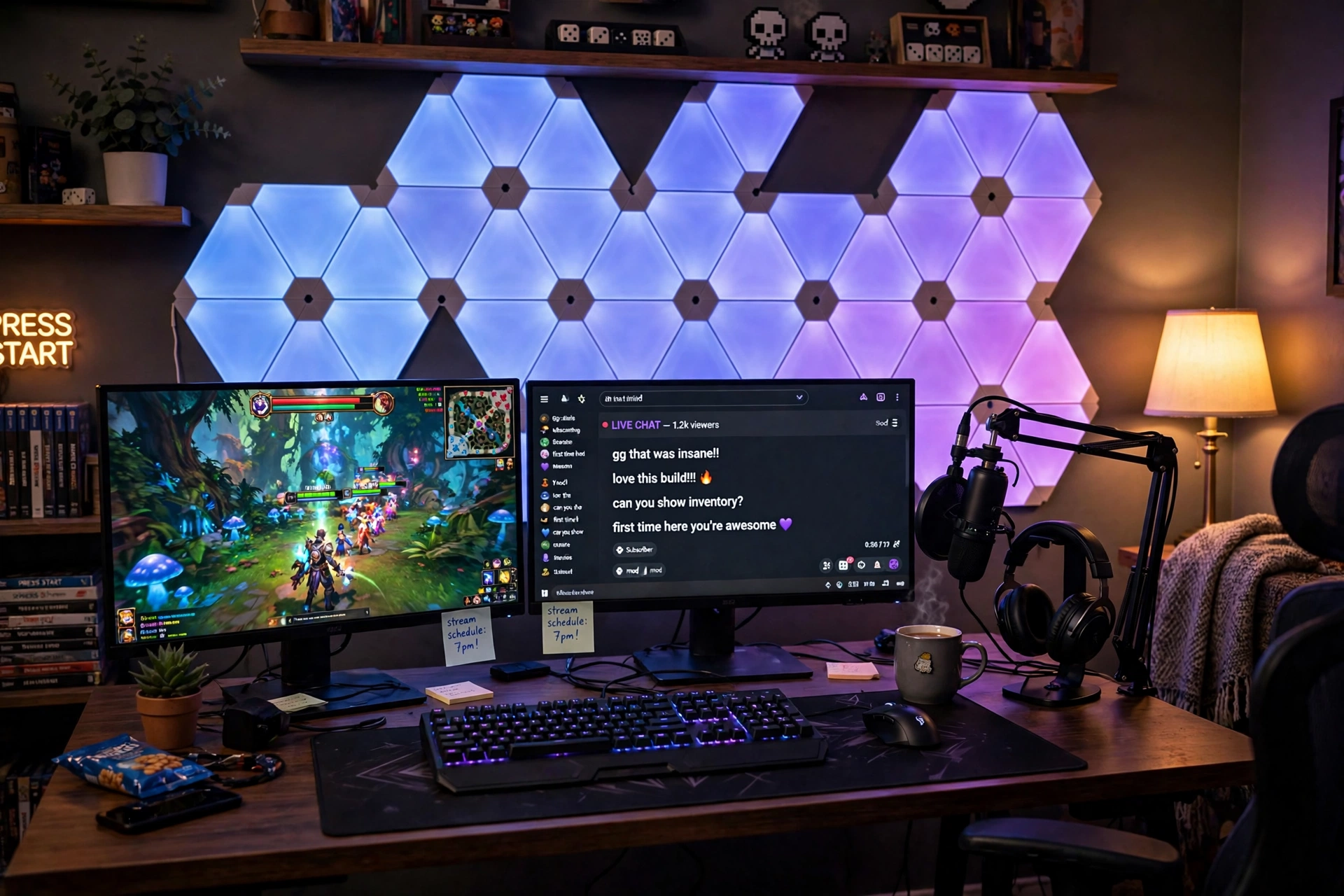
Hexagon panels are the classic streamer backdrop for a reason: they read clearly on camera, even in a small frame, and they give you color without clutter. Build the shape above and slightly behind your monitors so the panels frame your head on stream instead of competing with it.
- Desk: a plain dark desk keeps the panels as the star of the shot.
- Screens: two monitors, one for the game and one for chat, both on a single arm to free desk space.
- Sound: a boom arm mic sits just out of the camera frame so your voice stays clear.
- Light: set the panels to two colors that match your channel, not a full rainbow, so the look stays intentional.
Keep the desk simple: a keyboard, a mouse pad, and a headset stand are enough. When the wall does the talking, the desk can stay quiet.
Quick tip: test your panel colors on camera before you go live. Colors that look great in the room can wash out or clash on a webcam, so record a short test clip and adjust the brightness down a notch if the panels steal focus from your face.
Nanoleaf Shapes Triangles Smarter Kit
Modular triangle light panels that link together in any shape you like, with app and voice control for colors and scenes.
Why this one: the triangle shape photographs beautifully and the panels sync to music, which adds movement to a static backdrop.
Worth knowing: the panels stick to the wall with adhesive, so plan your layout before you press them on, since moving them later can mark paint.
Govee Glide Wall Light, 6 Pcs + 1 Corner
Slim wall light bars that connect into lines and angles, with RGBIC color that flows along each bar.
Why this one: the thin bars add a second layer of light beside the panels and fill gaps on a wide wall without looking busy.
Worth knowing: the bars need a power outlet nearby, so check your outlet placement before you map the layout.
2. Neon Sign Glow Wall
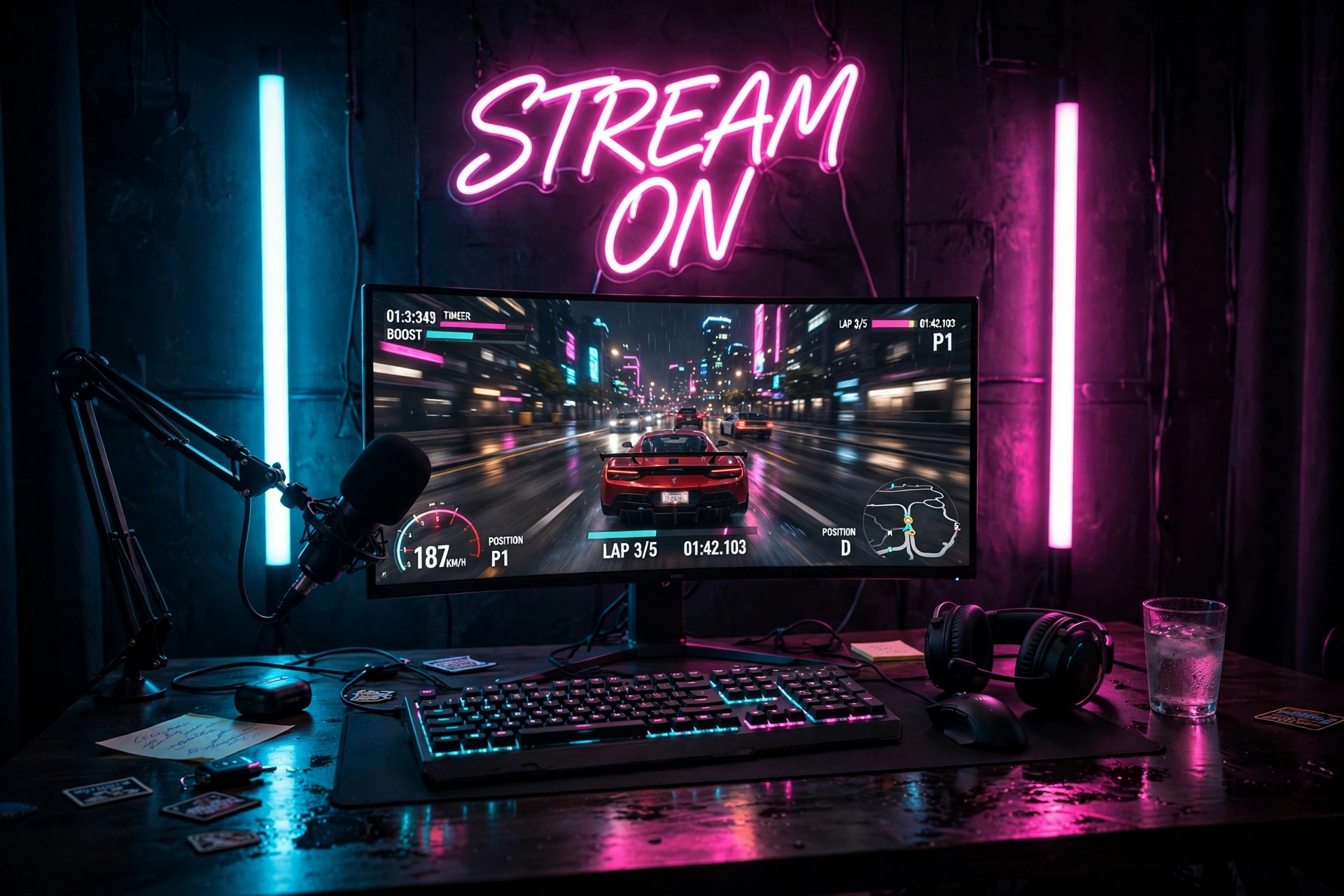
A neon sign turns your backdrop into your brand. Pick a word or your channel name and let it glow behind your head on every stream. Flank it with two vertical light bars and the wall suddenly has depth instead of one flat bright spot.
Here is how to set it up in order:
- Hang the sign first. Center it on the wall at head height when you sit at your desk.
- Add the light bars. Place one bar on each side of the sign, a little lower, so the glow wraps around it.
- Set your camera. Frame it just above your shoulder, never behind your head.
- Dim the room light. A darker room makes the neon pop and keeps your face lit by your key light, not the wall.
Finish with a curved ultrawide monitor, a mic on a boom arm, and headphones on a stand.
Before you buy a sign
Measure the wall first. A sign that is too small gets lost on camera, and one that is too wide crowds the frame. Pick one that fills about half of it.
Govee Glide Wall Lights, 2 Panels Set
A pair of slim RGBIC wall light bars that mount vertically and flow color along their length.
Why this one: two bars are exactly enough to frame a neon sign without overpowering it, and the flowing color adds life to the shot.
Worth knowing: the set covers a modest width, so measure your sign first if you want the bars to sit wider than it.
Philips Hue Play Light Bar, 2 Pack
Compact smart light bars that sit behind or beside your monitor and wash the wall with color you control from an app.
Why this one: the colors are rich and accurate, and the bars sync with your screen for a glow that moves with the game.
Worth knowing: the full smart features work best with a Hue Bridge, which is sold separately.
3. LED Strip Curtain Wall
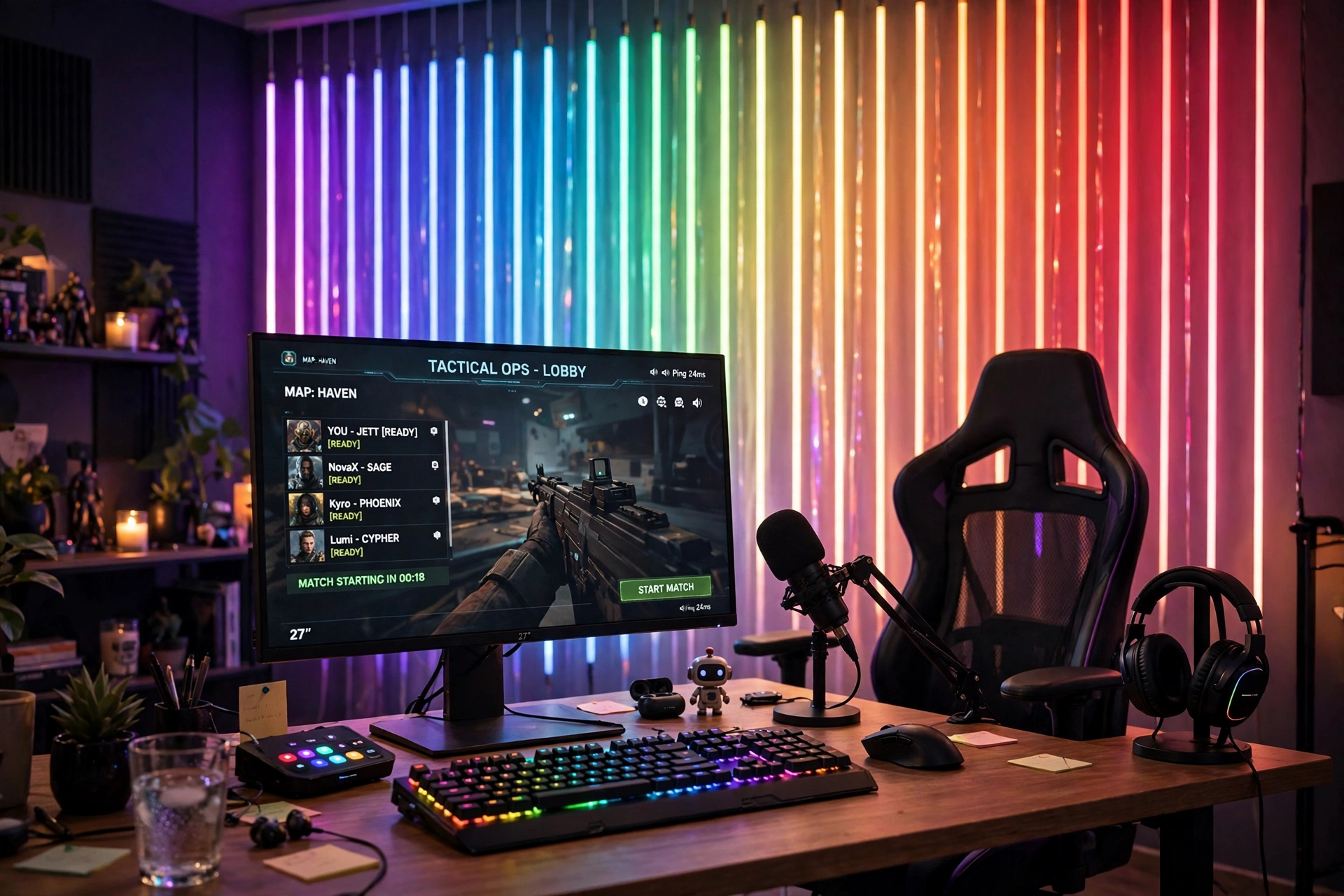
When you want maximum color for minimum spend, a curtain of LED strips is hard to beat. Hang the strips vertically, side by side, from the top of the wall down to the desk, and the whole wall behind you becomes a glowing curtain. It looks far more expensive than it is, and it hides a plain or damaged wall completely.
Hang it straight, the easy way
Run a strip of painter’s tape along the top of the wall first and mark your spacing with a pencil. Stick each LED strip to the tape line, then peel the tape away once the strips hold. The lines stay even, and you avoid the wavy look that gives the trick away on camera.
Put your monitor in front of the curtain, keep the desk dark and tidy, and add a headset stand and a small plant. Use one flowing scene, not flashing effects, since calm movement looks better on a long stream. If the glow feels too strong on your face, turn the strips down to about half brightness and let your key light do the rest.
Govee 65.6ft RGBIC LED Strip Lights
A very long RGBIC strip that shows multiple colors at once and cuts to fit, with app control and music sync.
Why this one: the length covers a full wall curtain in one purchase, and the RGBIC effect lets each strip show its own gradient.
Worth knowing: the adhesive works best on smooth, clean walls, so wipe the surface first and avoid textured paint.
Govee RGBIC LED Strip Lights, 16.4ft
A shorter RGBIC strip with the same multi-color flow, sized for a desk edge, shelf, or a single accent run.
Why this one: it fills the gaps at the desk edge and under shelves so the curtain glow continues onto the desk itself.
Worth knowing: one strip covers a short run only, so plan where the extra light goes before you unroll it.
4. Glowing PC Case Backdrop
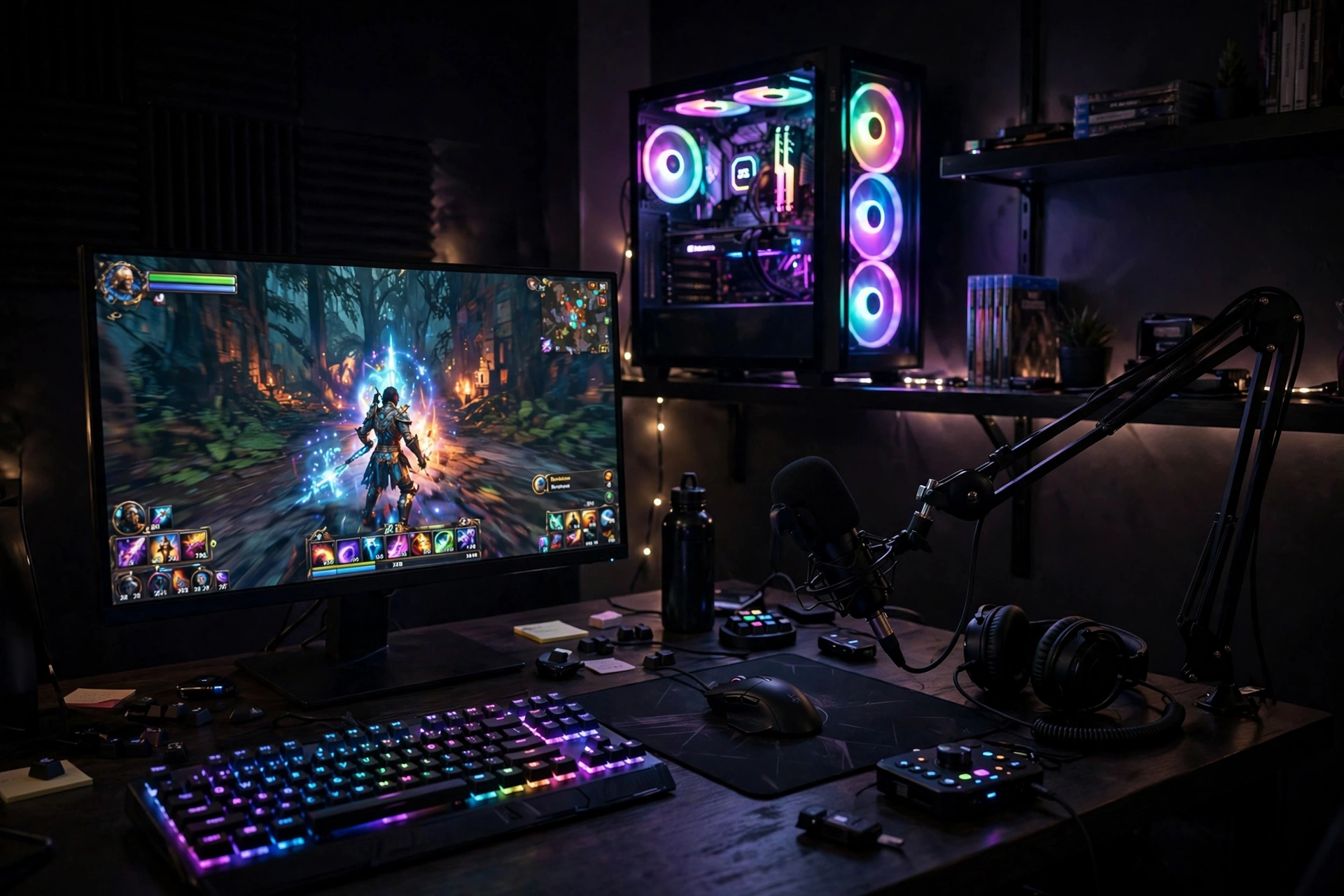
If you built a PC you are proud of, let the case be the backdrop. A glass panel case with glowing fans, on a shelf behind your desk, gives your stream a centerpiece no poster can match. It also tells viewers you care about the hardware, which builds trust with a gaming audience.
There are two ways to place it, and the right one depends on your room:
| Placement | Why it works | Watch out for |
|---|---|---|
| On a shelf behind the desk | The glow sits at head height on camera | The shelf must hold the weight safely |
| On the floor beside the desk | Easy cable access and airflow | It can fall out of the camera frame |
Either way, keep the fan colors in one family, such as blues and purples. Put your monitor in front, your mic on a boom arm, and your keyboard on a large pad. The case glows, the desk stays clean, and the shot looks like a real battlestation. For more sign and glow inspiration, the ideas in 15 Neon Gaming Room Ideas With Signs That Pop show how to layer light around a hero piece like this.
GAMDIAS NESO P1 White Tempered Glass Gaming Case
A white gaming case with tempered glass panels that show off the parts inside, built for airflow and a clean look.
Why this one: the wide glass side turns your parts into the backdrop, and the white frame keeps the glow bright on camera.
Worth knowing: it arrives without fans, so budget for a fan set to complete the glow.
AsiaHorse COSMIQ 120mm RGB Fans, 3 Pack
Three 120mm RGB case fans with bright, even lighting and a controller for color and speed.
Why this one: three fans fill a glass case with color at once, and the controller keeps all three in sync.
Worth knowing: check your case fan mounts and controller connections before ordering, since sizes and headers vary.
5. Corner Lamp Warm Glow
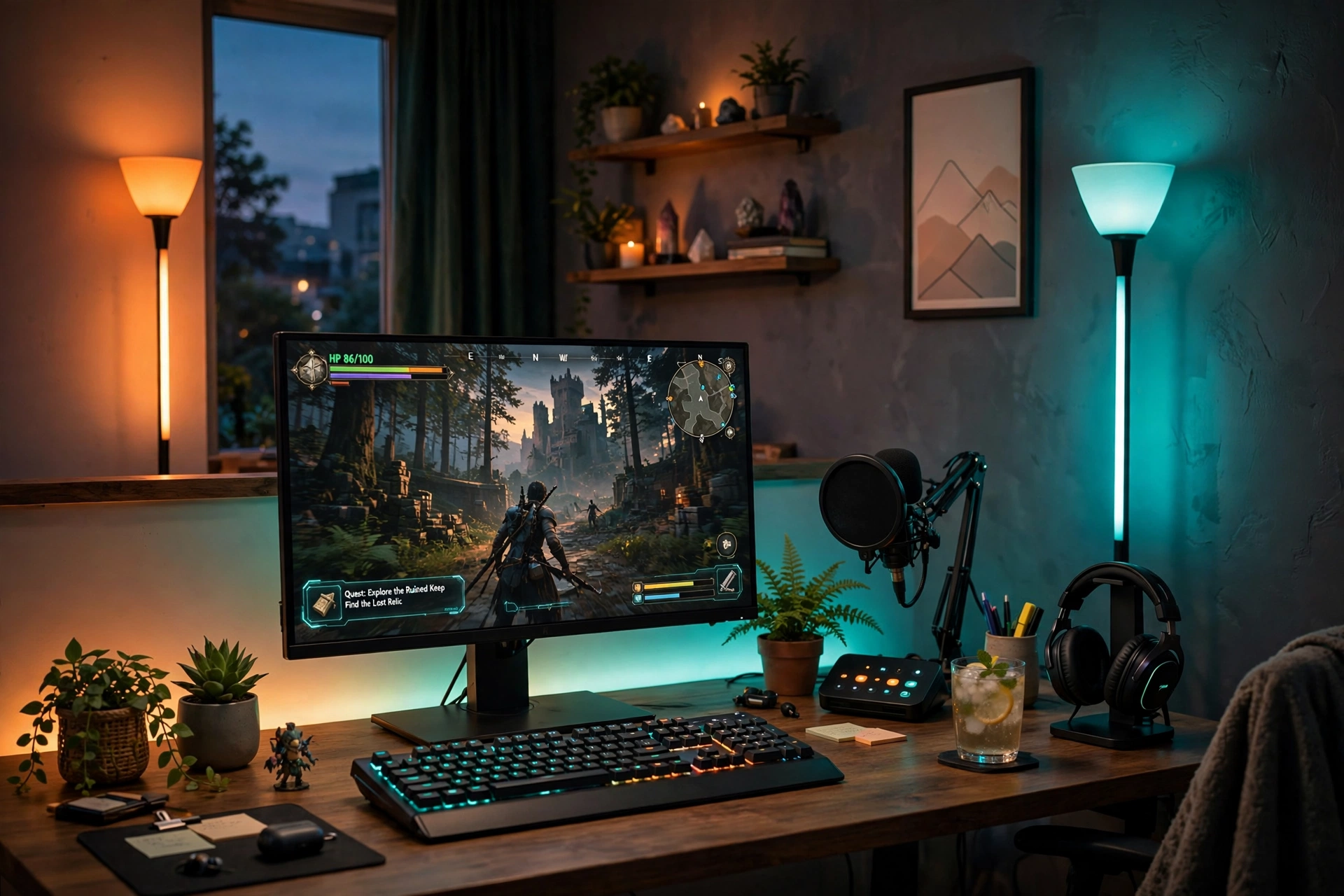
Not every stream needs bright color. Some of the most watchable setups use warm light and soft corners, and a pair of tall floor lamps does that beautifully. The lamps wash the wall in amber and teal, your face stays warm, and the room feels made for a long evening.
What works here:
- The corners: one lamp in each back corner frames you in light without any wall mounting.
- The gradient strip: a light strip behind the monitor adds a soft halo that separates you from the wall.
- The desk: wood tones and a plant keep the scene warm, so the tech does not feel cold.
- The screen: a single monitor keeps the focus on you and the game, not on a wall of displays.
Set the lamps to warm white with a hint of orange for talk streams, or shift to teal for a calmer mood. The change takes seconds in the app. Keep cables tucked behind the desk.
Small detail, big difference: angle the lamps slightly toward the wall, not into the room. The wall catches the light and spreads it softly, while direct light from the lamp can flare into your webcam.
Govee RGBIC Floor Lamp, LED Corner Lamp
A tall slim corner floor lamp with RGBIC color segments you control from an app, with music sync and scene modes.
Why this one: it fills a bare corner with light in seconds, no drilling or mounting, and the segmented color looks great on camera.
Worth knowing: it needs a corner or a wall behind it to bounce light off, so it works best pushed close to the wall.
Philips Hue Play Gradient Light Strip, 55 Inch
A gradient light strip that mounts behind a TV or monitor and blends several colors along its length.
Why this one: the smooth gradient halo behind the monitor adds depth to the shot without any extra clutter on the wall.
Worth knowing: the 55 inch size fits larger monitors best, so measure your screen before ordering.
6. Dark Moody Bias Light
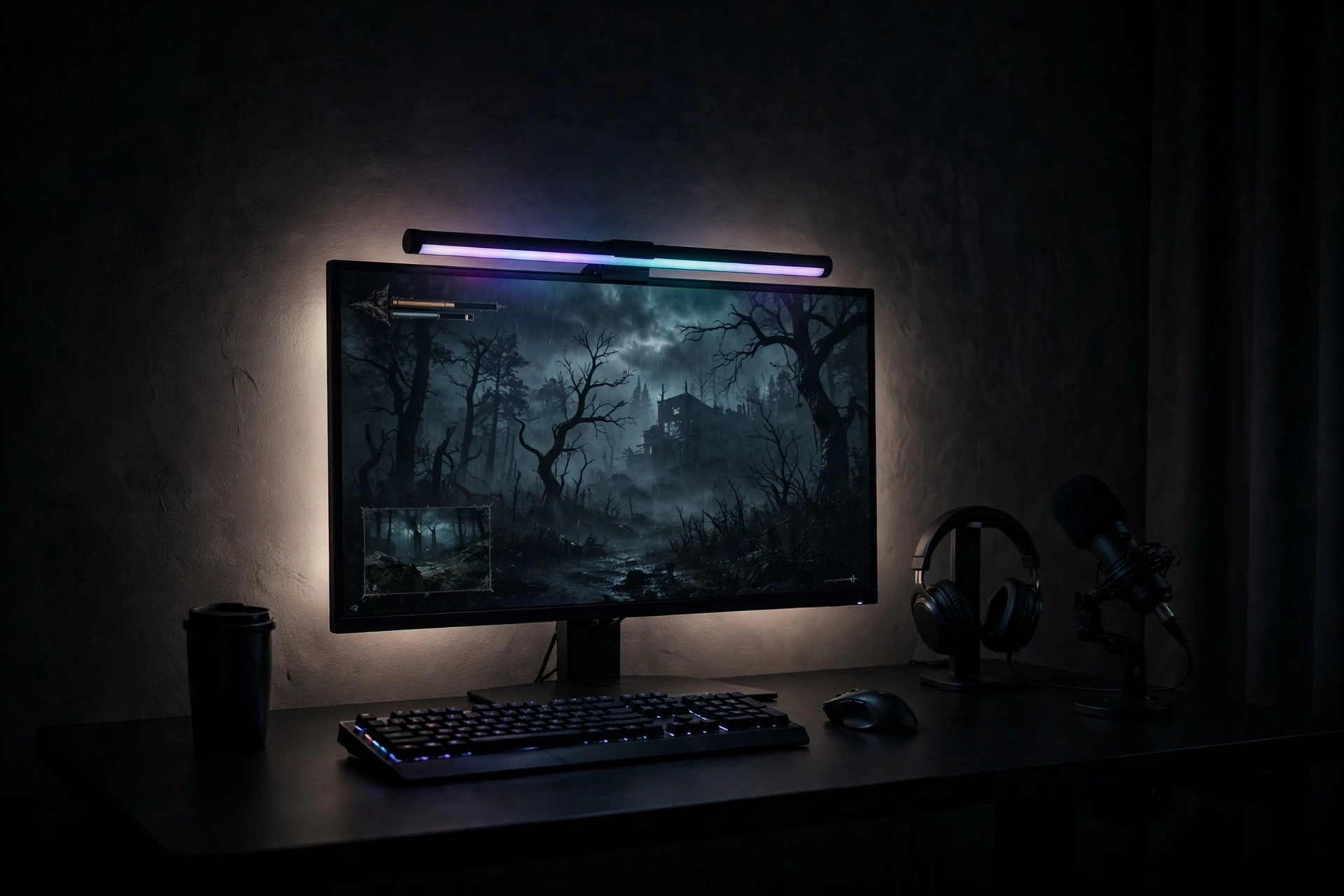
A dark backdrop can look more professional than a bright one, as long as the light is deliberate. The trick is a thin ring of bias light around the monitor: it keeps your eyes comfortable, stops the screen from floating in blackness, and gives the camera just enough glow to separate you from the wall.
Start with a charcoal or deep navy wall, or a dark curtain if you rent. Mount the monitor on an arm, clip the light bar on top, and let the bar wash the wall behind the screen. Add a desk lamp with a warm bulb on one side so your face has a soft key light. That is the whole setup, and it photographs like a studio.
Your dark backdrop checklist:
- ✓ Keep one warm light on your face, never rely on the screen alone
- ✓ Set the bias light to a soft white or pale blue, not a harsh color
- ✓ Hide cables, since dark rooms make stray wires stand out
- ✓ Test the shot at night, when the room is at its darkest
LG UltraGear 27GP850-B 27 Inch QHD Gaming Monitor
A 27 inch QHD gaming monitor with a fast refresh rate and sharp color, built for smooth gameplay and clean image quality.
Why this one: the bright, accurate panel holds up on camera even in a dark room, and the slim bezels keep the shot tidy.
Worth knowing: it ships with a standard stand, so add a monitor arm if you want the floating look.
Quntis Monitor Light Bar RGB PRO
A monitor light bar that clips on top of your screen, with front light for the desk and RGB backlight for the wall.
Why this one: it lights your desk without glare on the screen and throws a soft color wash on the wall behind you.
Worth knowing: it needs a USB port for power, so keep one free on your PC or a hub.
7. Pink Pop Backdrop
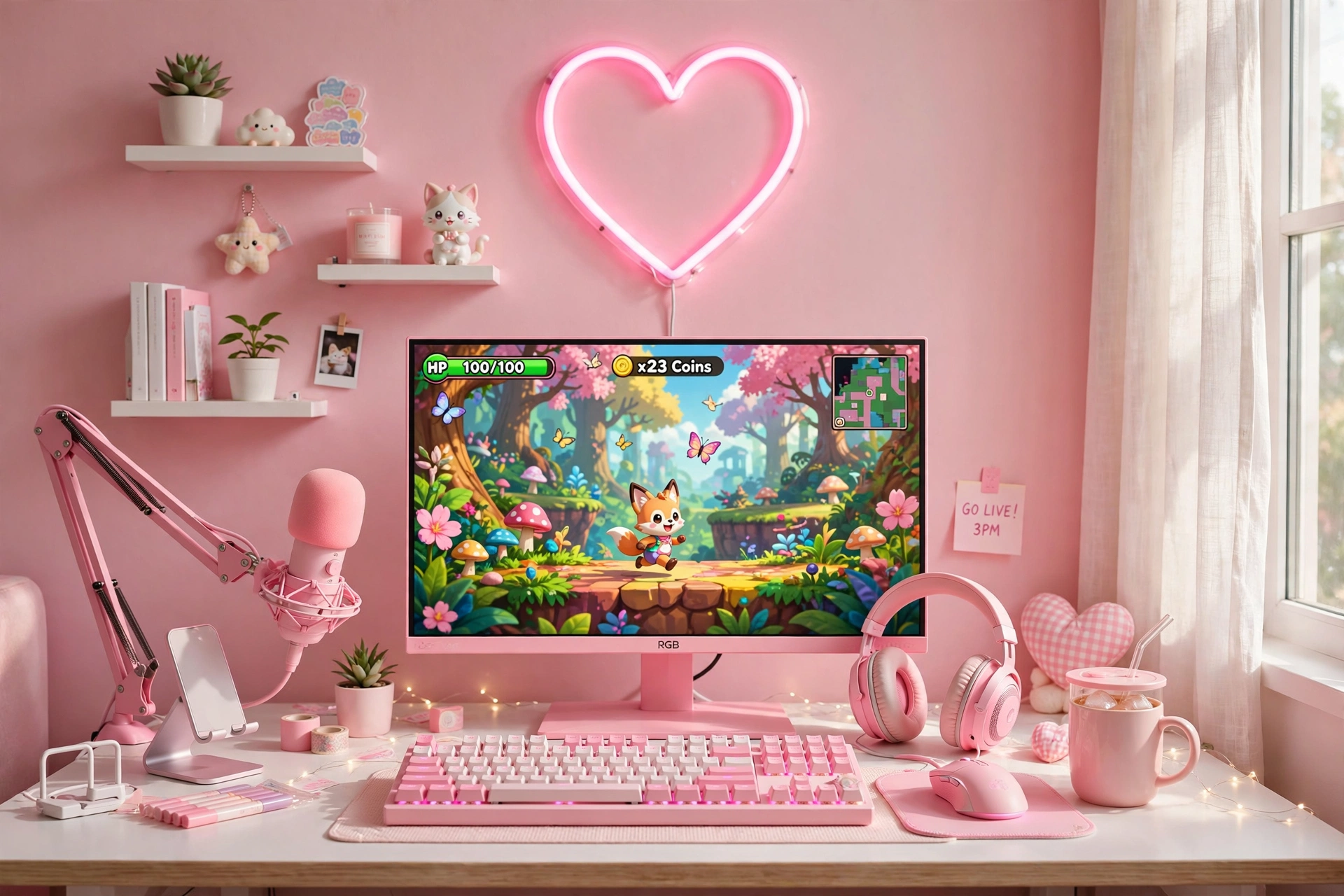
Pink is a bold choice for a stream backdrop, and that is exactly why it works. In a feed full of blue and purple rooms, a pink wall stops the scroll. The key is to commit: paint or paper one wall soft pink, match the monitor and keyboard, and let one small neon sign be the only decoration.
- Wall: soft pink paint or removable wallpaper, one wall only, so the room still feels calm.
- Screen: a pink framed monitor keeps the color story going right down to the desk.
- Keyboard: a pink mechanical keyboard ties the desk to the wall in one glance.
- Shelves: one small white shelf with a plant or two, nothing more, so the wall stays clean.
Daylight helps this setup shine, so stream near a window when you can. Balance the pink with a neutral white light from the front so it does not tint your skin on camera.
Quick tip: if painting is not an option, a pink tapestry or a large pink poster board behind your desk gives you the same color block on camera, and it comes down in minutes when you move out.
Pixio PX279 Wave Pink 27 Inch Gaming Monitor, 240Hz
A 27 inch pink gaming monitor with a very fast 240Hz refresh rate and a bright, colorful display.
Why this one: the pink frame is the whole point here, and the fast panel keeps competitive games smooth.
Worth knowing: the pink color is a statement, so make sure it matches the rest of your room before you commit.
Razer BlackWidow V3 Mechanical Gaming Keyboard, Quartz Pink
A mechanical gaming keyboard in quartz pink with clicky switches and bright RGB backlighting.
Why this one: it matches the pink monitor perfectly and the RGB lighting lets you tune the glow to the wall.
Worth knowing: the clicky switches are loud, so they will be heard on stream unless your mic is set to filter them.
8. Clean White Minimal Backdrop
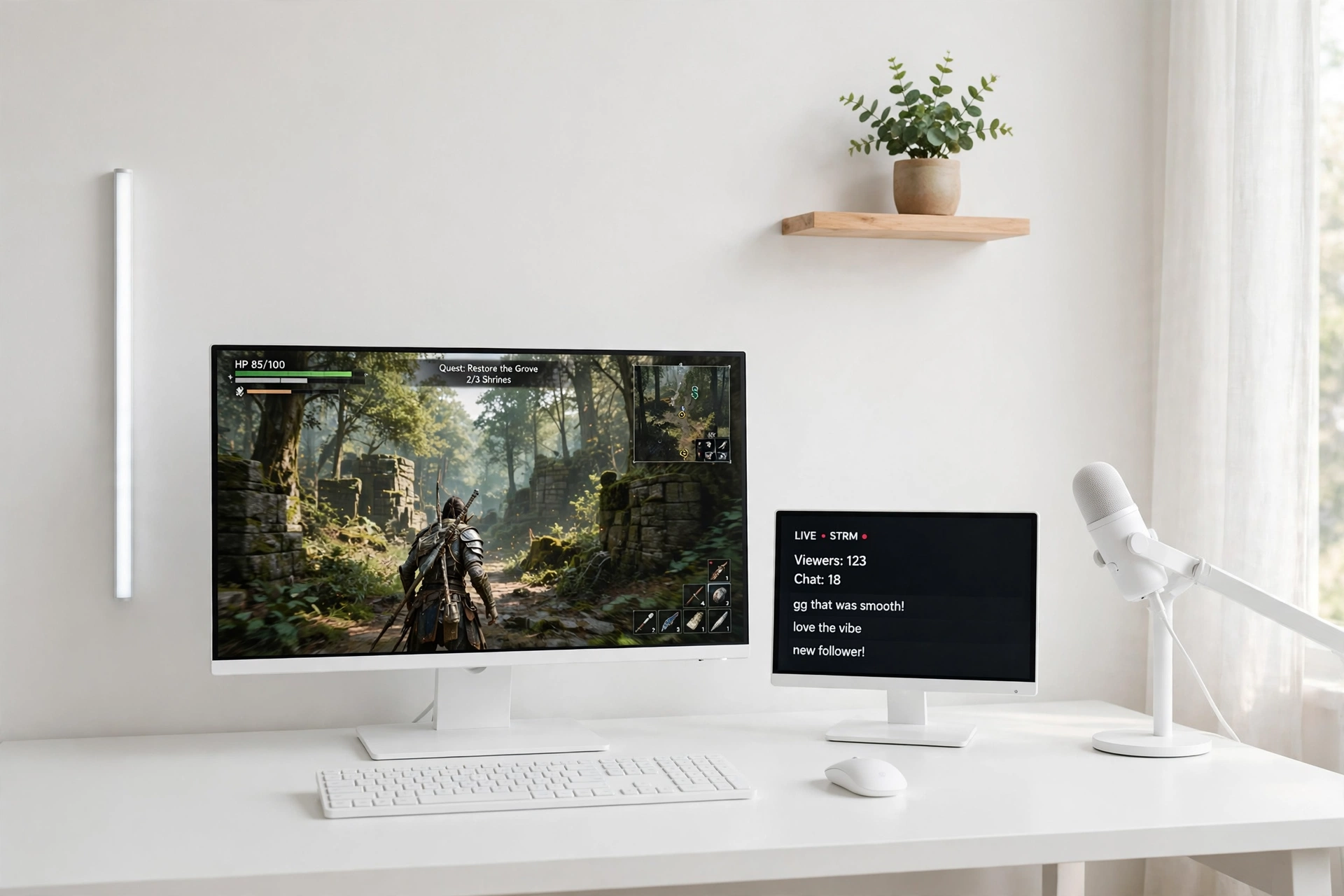
Sometimes the best backdrop is almost nothing. A plain white wall, one slim light bar, and a single wooden shelf with a plant reads as calm and professional, and it works for any kind of stream, from gaming to study sessions to just chatting. Nothing on the wall competes with you.
| Element | Keep it | Skip it |
|---|---|---|
| Wall | One shelf, one plant | Posters and clutter |
| Light | One slim bar, soft white | Flashing color scenes |
| Desk | Monitor, keyboard, mic | Extra screens and boxes |
The discipline is the design here. Hide every cable, keep the desk to the essentials, and let the white wall do the work. A white desk, a sharp monitor, and a good keyboard are all you need. This setup also photographs beautifully for thumbnails, since a clean background makes text overlays easy to read.
Acer Nitro VG272U V3 27 Inch QHD Gaming Monitor, 180Hz
A 27 inch QHD gaming monitor with a 180Hz refresh rate, sharp detail, and a clean modern frame.
Why this one: the slim frame and crisp panel suit a minimal desk, and the high refresh rate keeps games smooth.
Worth knowing: the stand takes up a fair amount of desk depth, so a monitor arm frees space if your desk is shallow.
Corsair K70 CORE RGB Mechanical Gaming Keyboard
A full size mechanical gaming keyboard with RGB backlighting, quiet linear switches, and a solid build.
Why this one: the quiet switches keep typing noise low on stream, and the clean design fits a minimal desk.
Worth knowing: it is a full size board, so it needs a desk with room for a mouse pad beside it.
Frequently asked questions
What is the cheapest streaming backdrop that still looks good?
A curtain of LED strips is the lowest cost route in this guide. One long strip set covers a full wall, hides a plain background, and gives you color control from an app. A single light bar behind the monitor is the next step up if you want a cleaner look.
How do I keep my backdrop from distracting viewers?
Pick one hero element, such as a sign or a panel wall, and keep everything else calm. Set moving light effects to slow and gentle, keep brightness at about half, and make sure no bright light sits directly behind your head.
Do I need a key light if my backdrop is bright?
Yes. Backdrop light is for the wall, not for your face. A soft key light in front of you keeps your face clear and stops the camera from exposing for the bright wall instead of you.
Can I build a good backdrop in a rented room?
Yes. Floor lamps, light bars on stands, a tapestry, and adhesive mounted panels all come down without damage. Avoid screws and heavy wall mounts, and use removable strips or stands instead.
What color backdrop works best on camera?
Blue and purple read well on most webcams and flatter most skin tones. Warm amber works for cozy streams. Avoid pure red behind your head, since it can tint your skin and dominate the frame.
How far should my desk sit from the backdrop wall?
About two to three feet gives the camera depth and lets light fall on the wall without crowding you. If your room is tight, even one foot of space helps, as long as the light bar or panels are not touching your chair.
Conclusion
Your backdrop is part of your stream, not decoration around it. Pick the one that matches how you want to feel on camera: bright panels for energy, a neon sign for branding, warm lamps for long relaxed evenings, or a clean white wall for a professional look. Start with one hero piece, test it on camera, and adjust the brightness until your face leads the shot. The wall behind you should support your stream, never steal it. For a darker take on the same idea, the moody setups in 15 Dark Gaming Setup Ideas for a Moody Battlestation are a great next read.
