
9 Home Office Ideas for a Tablet Setup
By Maya Bennett, Founder & Editor. A tablet leads every setup below, held up on a stand or in a keyboard cradle with its screen on, while the desk, the chair, the light, the storage, and the power stay practical and copyable. No laptop leads any setup here, so if your main device is a tablet, these are built around it. For more ideas in this series, browse the Home Office Ideas category.
As an Amazon Associate I earn from qualifying purchases. Please see our affiliate disclosure for details. This article prints no prices, because prices change. Check the listing before you buy, and confirm you have the exact variant named.

AI-generated image
In this article
- 1. The Silver Lamicall Stand Desk
- 2. The Gooseneck Clip-On Tablet Desk
- 3. The K380 Multi-Device Tablet Desk
- 4. The Foldable Arm Tablet Desk
- 5. The Arteck Cradle Keyboard Desk
- 6. The OMOTON Grey Dock Tablet Desk
- 7. The KU XIU Arm Tablet Desk
- 8. The Pebble Keys 2 Tablet Desk
- 9. The iClever Slim Keyboard Tablet Desk
- Frequently asked questions
- Conclusion
At a glance
| Setup | Key product | Best for |
|---|---|---|
| 1. The Silver Lamicall Stand Desk | Lamicall Tablet Stand, Adjustable Tablet Holder, Desktop Stand Dock Holder Compatible with 4-13″ Tablets, Silver | A silver stand that turns a tablet into the main screen on an oak desk |
| 2. The Gooseneck Clip-On Tablet Desk | Lamicall Gooseneck Tablet Holder, Flexible Arm Clip Tablet Mount, Compatible with 4.7-10.5″ Tablets | A clip-on arm that holds the tablet at eye level on a plain black desk |
| 3. The K380 Multi-Device Tablet Desk | Logitech K380 Multi-Device Bluetooth Keyboard, Dark Grey | One round-keyed keyboard that pairs with a tablet and two more devices |
| 4. The Foldable Arm Tablet Desk | Pisipi Tablet Stand Holder for Desk, Aluminum Alloy iPad Desk Mount with 360 Degree Rotate Base, Adjustable and Foldable Tablet Arm for 4.7-15.6″ Screens | A folding aluminum arm that lifts a big tablet to eye level |
| 5. The Arteck Cradle Keyboard Desk | Arteck Wireless Bluetooth Keyboard for Windows, iOS, Android, Computer, Laptop, Smartphone, Multi-Functional with Built-in Cradle | A keyboard whose cradle holds the tablet upright on a white desk |
| 6. The OMOTON Grey Dock Tablet Desk | OMOTON Tablet Stand Holder Angle Adjustable, T1 Desktop Aluminum Tablet Dock Cradle Compatible with iPad Air/Mini, iPad 10.2, iPad Pro 11/12.9, Samsung Tab and More Up to 12.9″, Grey | A grey aluminum dock that keeps the tablet steady on a black oak desk |
| 7. The KU XIU Arm Tablet Desk | KU XIU Aluminum Alloy Tablet Stand for Desk, Adjustable Foldable Arm Holder Mount Compatible with iPad 10/9th, iPad 13/12.9/11″ Pro Air Mini, Portable Monitor 7-15.6″, Samsung Galaxy Tab S9/FE/A9/S6 | A long-reach aluminum arm on a wide white desk |
| 8. The Pebble Keys 2 Tablet Desk | Logitech Pebble Keys 2 K380s, Multi-Device Bluetooth Wireless Keyboard with Customizable Shortcuts, Slim and Portable, Easy-Switch for Windows, macOS, iPadOS, Android, Chrome OS, Tonal Graphite | A slim pebble keyboard for a small black desk |
| 9. The iClever Slim Keyboard Tablet Desk | iClever BK10 Bluetooth Keyboard, Slim, USB-C Rechargeable | A slim rechargeable keyboard on a five-drawer rustic desk |
1. The Silver Lamicall Stand Desk
AI-generated image
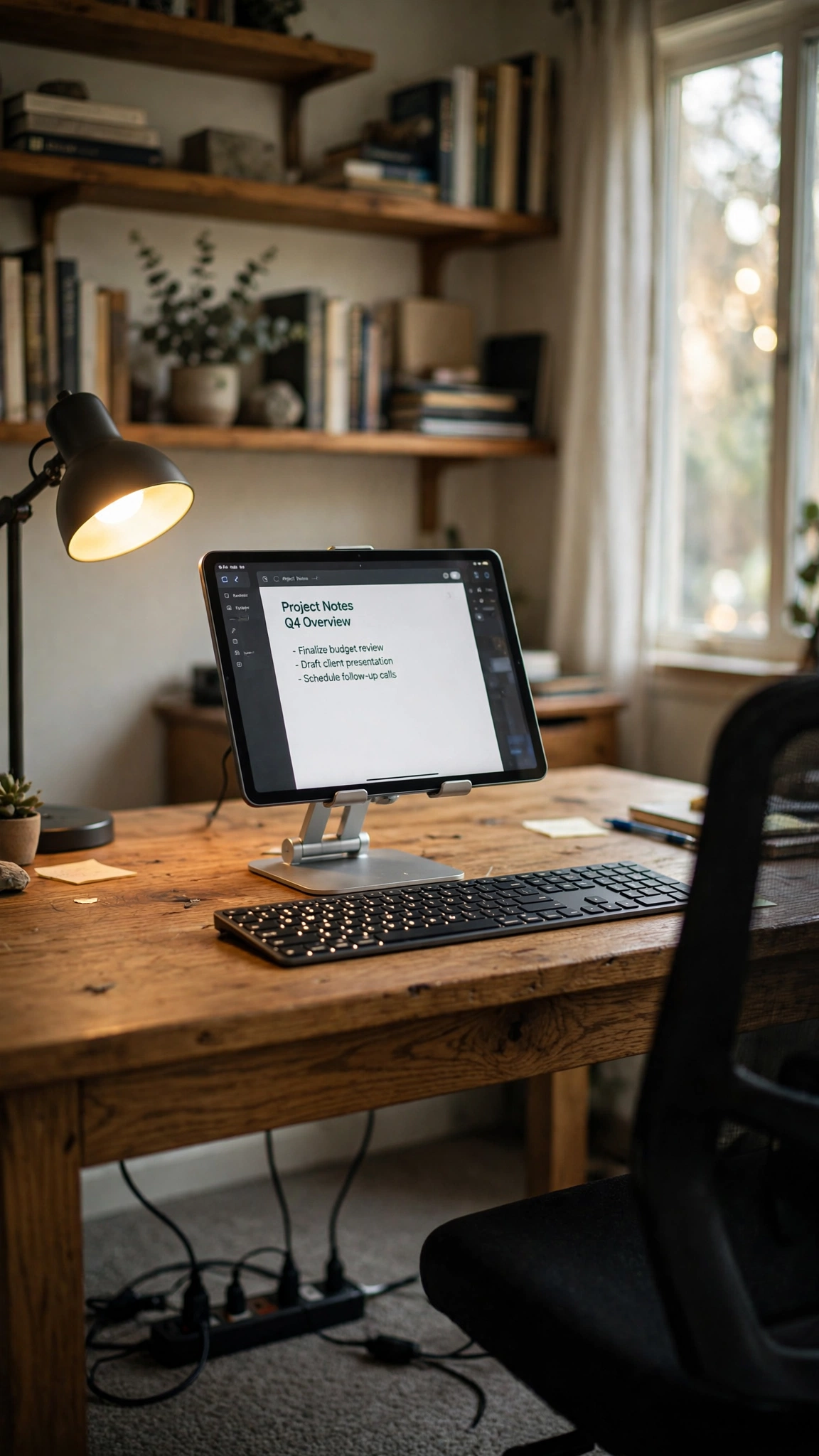
A tablet works best as a main screen when it sits at eye level, and that is exactly what this setup does. The silver Lamicall stand holds the tablet upright on an oak desk, tilted just enough to read without hunching, while the slim Arteck keyboard sits in front of it for typing. The backlit keys help in the evening, and the keyboard pairs over Bluetooth, so no cable crosses the desk.
- Set the stand angle before you start typing, so the tablet screen meets your eyes.
- Keep the keyboard centered under the tablet.
- Charge the tablet overnight, so a full day of calls and notes never waits on a cable.
The desk has power outlets built in, so the tablet charger plugs straight into the desk top, and a lamp lights the keyboard after dark. Shelves behind the desk hold books and storage boxes. This is the setup to copy if you already own a tablet, because the stand and the keyboard together cost less than a new laptop, and your notes, calls, and documents all live on the screen you already carry.
KEY PIECE
Lamicall Tablet Stand, Adjustable Tablet Holder, Desktop Stand Dock Holder Compatible with 4-13″ Tablets, Silver
Why this one: A silver adjustable tablet stand with an angle you can change, sized for tablets from 4 to 13 inches.
Worth knowing: It is a fixed-height stand, so the angle adjusts but the height does not, and a thick case may need removing first.
COMPLETES THE SETUP
GreenForest 47 Inch Computer Desk with Power Outlets, Oak
Why this one: A 47 inch oak desk with built in power outlets and a monitor stand, sized for a tablet, a keyboard, and a chair.
Worth knowing: The desk top is oak, so match the stand and the keyboard to warm wood tones.
COMPLETES THE SETUP
Arteck Universal Backlit 7-Colors Ultra Light Slim Portable Wireless Bluetooth 3.0 Keyboard for iOS iPad Pro, Air, Mini, Android, Windows Tablets PC Smartphone, Built in Rechargeable 6-Month Battery
Why this one: A slim backlit Bluetooth keyboard made for tablets, with seven backlight colours and a rechargeable battery.
Worth knowing: It is a compact keyboard, so the keys sit closer together than a full size keyboard.
2. The Gooseneck Clip-On Tablet Desk
AI-generated image
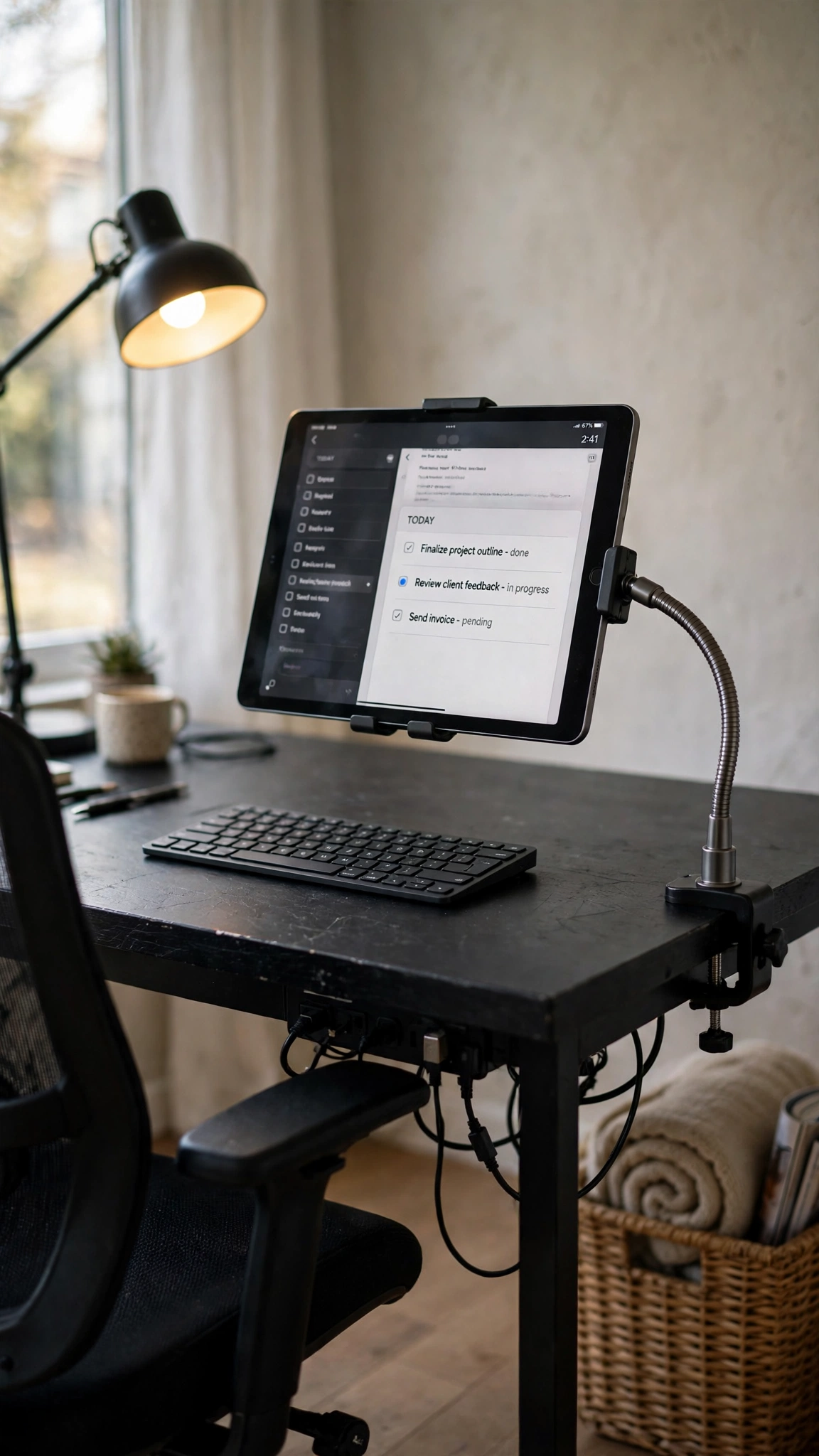
When the desk top is small, the tablet has to float, and a gooseneck arm is the simplest way to lift it. The Lamicall holder clips to the desk edge and bends into place, holding the tablet at eye level while the desk top stays free for a small wireless keyboard, a notebook, and a mug. The arm turns a full 360 degrees, so the tablet swings toward you for a call and back for typing without moving the desk.
What works here: A plain black 47 inch desk, a clip-on arm that frees the whole desk top, a small wireless keyboard, an ergonomic office chair, a desk lamp, and a power strip under the desk for the tablet charger and the lamp.
Storage is a basket beside the desk, holding chargers and notebooks, because a plain desk has no drawers of its own. If your desk is tight on space, this is the setup to copy, because the tablet hangs off the edge instead of sitting on it, and the keyboard is the only thing that needs desk space at all.
KEY PIECE
Lamicall Gooseneck Tablet Holder, Flexible Arm Clip Tablet Mount, Compatible with 4.7-10.5″ Tablets
Why this one: A flexible gooseneck arm with a clip mount that holds tablets from 4.7 to 10.5 inches at any angle.
Worth knowing: It suits tablets up to 10.5 inches, so a 12.9 inch tablet needs a larger stand instead.
COMPLETES THE SETUP
ODK Computer Desk 47 Inch, Black
Why this one: A simple 47 inch black desk with a clean top that suits a clip-on arm and a small keyboard.
Worth knowing: It has no drawers, so storage needs a basket or a shelf nearby.
COMPLETES THE SETUP
GABRYLLY Ergonomic Office Chair, Black
Why this one: A black ergonomic office chair with a mesh back that suits long days at a small desk.
Worth knowing: Check the seat height against your desk, because a clip-on arm puts the tablet higher than a flat stand.
3. The K380 Multi-Device Tablet Desk
AI-generated image
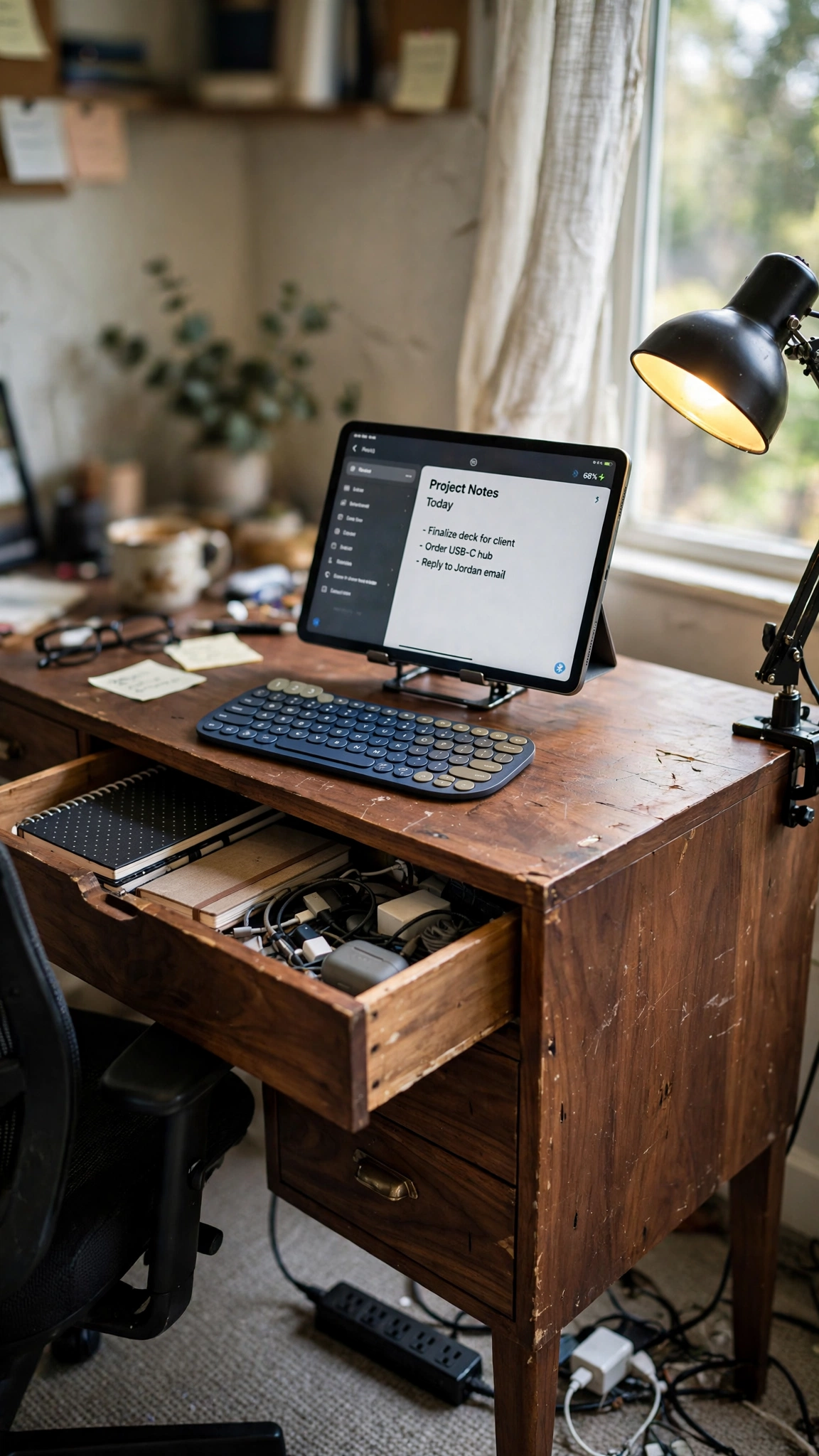
One keyboard for three devices is the whole point of this setup. The Logitech K380 pairs with the tablet, a phone, and one more device, and a single key switches between them, so the tablet stays the main screen. The tablet sits propped on a small stand at the back of a walnut desk, and the round keys make the K380 easy to spot in a room full of plain black keyboards.
- Pair the tablet to key one, the phone to key two, and keep key three free for a spare device.
- Give the top drawer to the tablet charger, so it is always in the same place.
- Use the lower drawers for files and notebooks, not for things you need hourly.
A clamp lamp on the desk edge lights the keyboard without eating desk space, and a power strip under the desk feeds the tablet charger and the lamp. This is the setup to copy if your tablet shares your day with a phone, because one keyboard covers both, and the walnut drawers hide the chargers a multi-device desk collects.
KEY PIECE
Logitech K380 Multi-Device Bluetooth Keyboard, Dark Grey
Why this one: A compact multi-device Bluetooth keyboard that pairs with up to three devices and switches between them with one key.
Worth knowing: It runs on replaceable batteries, so keep a spare pair in the desk drawer.
COMPLETES THE SETUP
GreenForest Computer Desk with Drawers and Monitor Stand, 51 inch, Walnut
Why this one: A 51 inch walnut desk with drawers, a monitor stand, and power outlets for a setup with real storage.
Worth knowing: The desk top is walnut, so pair it with a dark keyboard and a dark lamp for a calm match.
COMPLETES THE SETUP
HaFundy LED Desk Lamp with Clamp, Swing Arm, Black, Large
Why this one: A large swing arm LED lamp that clamps to the desk edge and frees the whole desk top.
Worth knowing: The clamp fits desks up to a set thickness, so check your desk edge on the listing.
4. The Foldable Arm Tablet Desk

AI-generated image
A big tablet needs a strong arm, and this one is built from thick aluminum alloy with a 360 degree rotating base. The Pisipi arm clamps to a rustic oak desk and holds tablets and portable screens up to 15.6 inches, so even the largest tablet sits steady at eye level, and the arm folds flat when the workday ends. A slim wireless keyboard sits below the tablet, and the desk drawers hold the charger, notebooks, and files.
TRY THIS
Fold the arm flat at the end of the day, so the desk turns back into a plain oak top for dinner or reading.
A power strip with USB ports sits on the desk edge, feeding the tablet and the lamp, and an office chair rounds out the scene. If your tablet is the large Pro size, this is the setup to copy, because a small dock stand would wobble under it, while this arm is rated for the weight, and the fold flat trick keeps a big setup from taking over the room.
KEY PIECE
Pisipi Tablet Stand Holder for Desk, Aluminum Alloy iPad Desk Mount with 360 Degree Rotate Base, Adjustable and Foldable Tablet Arm for 4.7-15.6″ Screens
Why this one: A folding aluminum alloy arm stand with a 360 degree rotating base, made for tablets and portable screens up to 15.6 inches.
Worth knowing: A search result showed no featured offers for this listing, so confirm the listing before ordering.
COMPLETES THE SETUP
EnHomee 40 Inch Small Desk with Power Outlets, Computer Desk with Drawers, Dark Rustic Oak
Why this one: A 40 inch dark rustic oak desk with drawers and built in power outlets, sized for a tablet arm and a keyboard.
Worth knowing: At 40 inches it is a compact desk, so measure the wall before ordering.
COMPLETES THE SETUP
AUOPLUS Power Strip, 6 Outlet and 4 USB, 10 Ft
Why this one: A 10 foot power strip with six outlets and four USB ports, so the tablet, the lamp, and the keyboard charger all plug in at once.
Worth knowing: A 10 foot cord is long, so coil the spare length under the desk instead of letting it trail.
5. The Arteck Cradle Keyboard Desk
AI-generated image
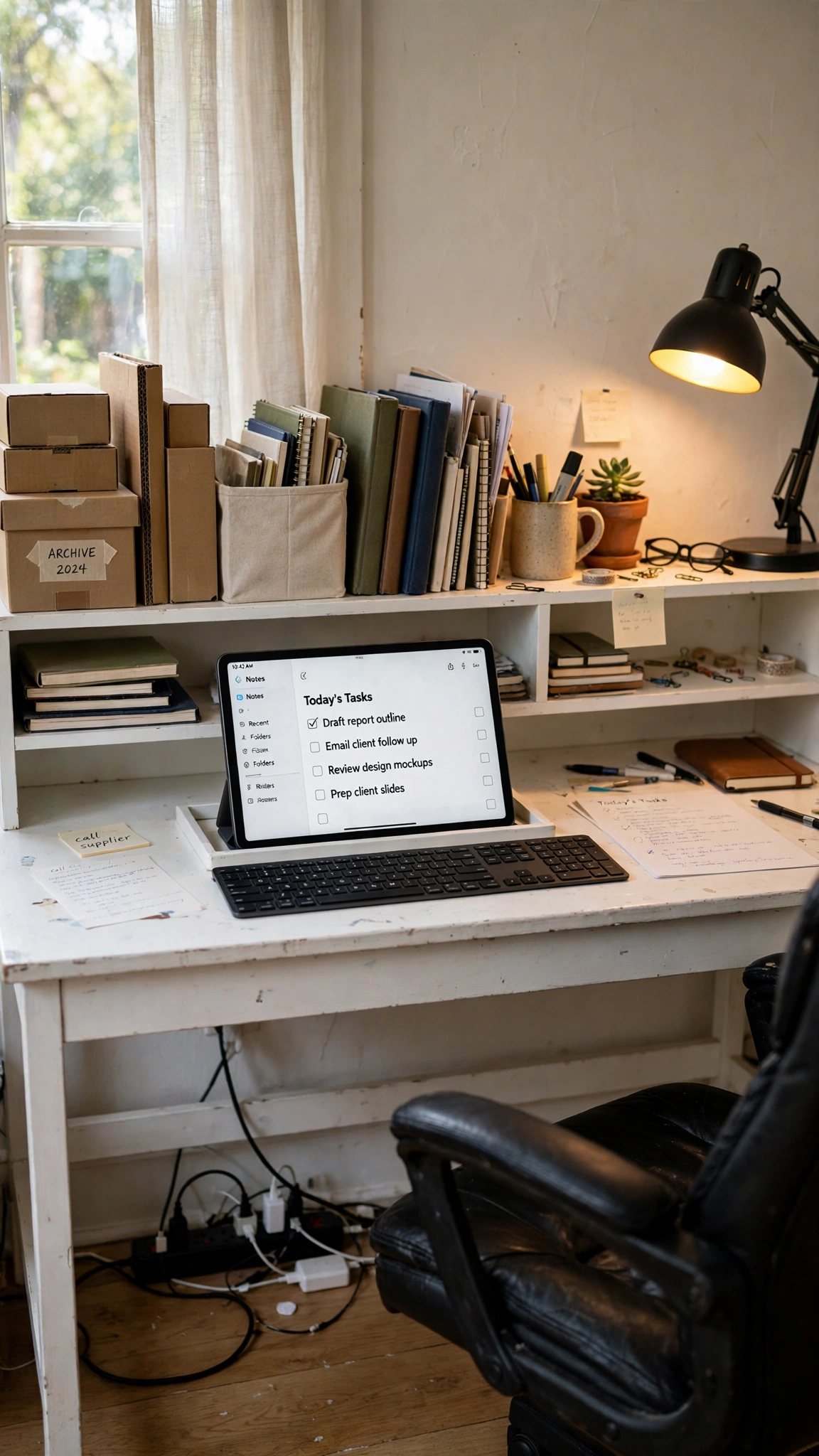
Some keyboards carry the tablet for you, and this Arteck is one of them. Its built-in cradle holds the tablet upright right behind the keys, so the tablet and the keyboard act as one piece. The tablet screen sits at the back of a white writing desk, a black faux leather task chair sits in front of it, and the whole setup packs down to a keyboard and a tablet when the day ends.
- Slide the tablet into the cradle before you pair the keyboard, so the screen is steady while Bluetooth connects.
- Use the desk shelf for chargers and notebooks, so the white top stays bright.
- Plug the tablet into a power strip under the desk, so no cable crosses the white surface.
A desk lamp lights the keys for evening work, and the desk drawers hold the rest. This setup suits writers and students, anyone whose work is mostly words on one screen. If you want the simplest tablet desk of all, this is the setup to copy, because the keyboard is the stand, and there is nothing else to set up.
KEY PIECE
Arteck Wireless Bluetooth Keyboard for Windows, iOS, Android, Computer, Laptop, Smartphone, Multi-Functional with Built-in Cradle
Why this one: A wireless Bluetooth keyboard with a built-in cradle that holds a tablet or phone upright behind the keys.
Worth knowing: The cradle suits slim tablets best, so check the fit if your tablet wears a thick case.
COMPLETES THE SETUP
Tribesigns Computer Desk with Storage Shelf and Drawers, Modern 47 inch Office Writing Desk, White
Why this one: A 47 inch white writing desk with a storage shelf and drawers for a tablet and paper work.
Worth knowing: It is a writing desk, so it suits a tablet better than a large desktop setup.
COMPLETES THE SETUP
Amazon Basics Office Computer Task Desk Chair, Mid-Back, Black Faux Leather
Why this one: A black faux leather mid back task chair, simple, wipe clean, and easy on the budget.
Worth knowing: It is a mid back chair with no headrest, so check that it suits how you sit.
6. The OMOTON Grey Dock Tablet Desk
AI-generated image
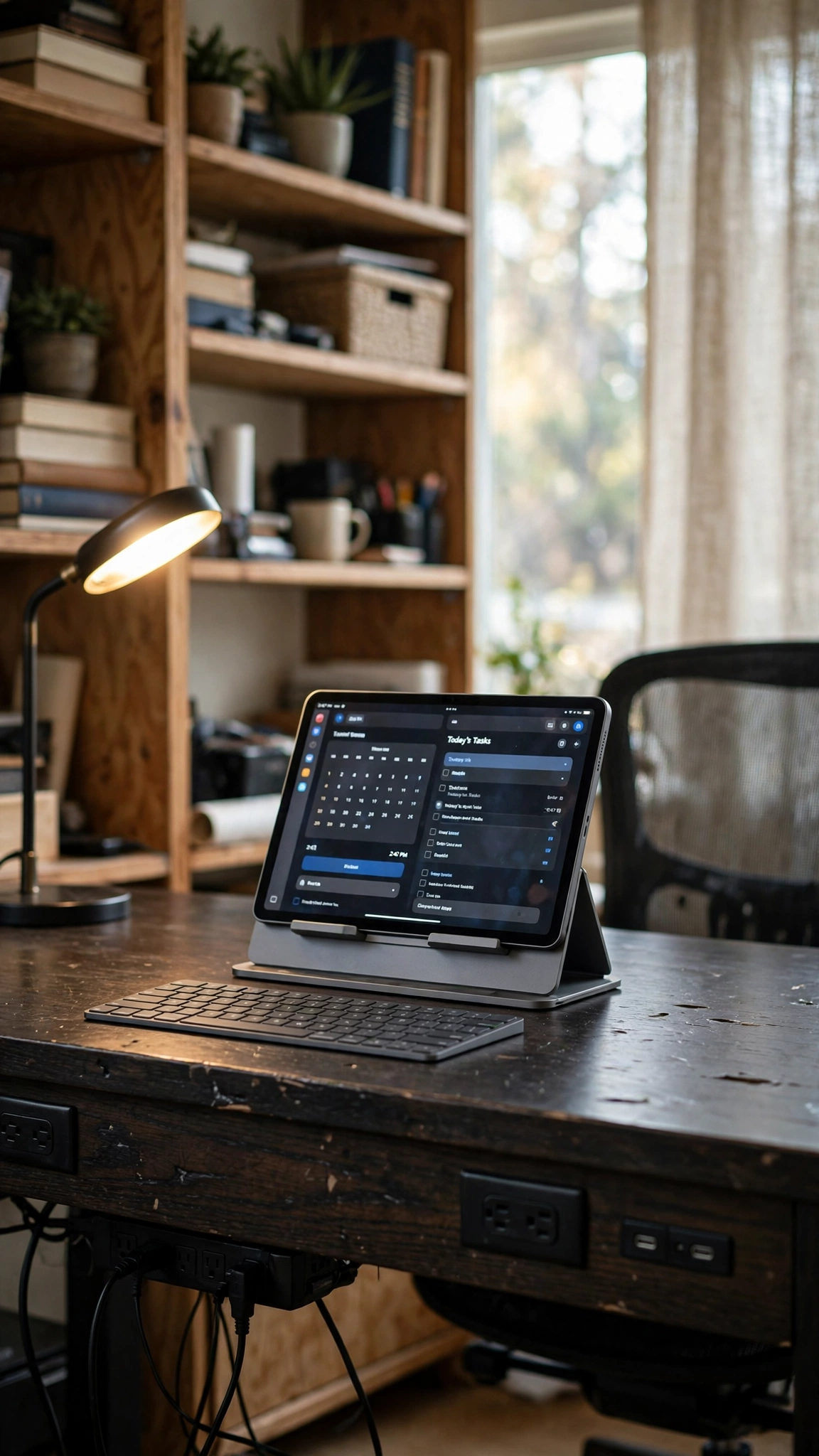
A dock cradle is the calmest kind of tablet stand, because it does one thing and does it well. The grey OMOTON dock is cut from aluminum, and the tablet drops into its cradle at a fixed angle that suits reading and typing alike. It sits on a black oak desk with power outlets built in, so the tablet charger plugs into the desk itself, and a slim keyboard waits in front of the dock.
What works here: A black oak desk with built in power, a grey aluminum dock that matches the desk hardware, a mesh office chair with a footrest, a slim keyboard, a desk lamp, and shelves behind the desk for books and boxes.
A power strip under the desk feeds the lamp and the spare chargers, and the dock keeps the tablet in the same spot every day, which is the whole point of a dock. If you like a desk that never needs rearranging, this is the setup to copy, because the tablet and the keyboard each have one home, and nothing drifts.
KEY PIECE
OMOTON Tablet Stand Holder Angle Adjustable, T1 Desktop Aluminum Tablet Dock Cradle Compatible with iPad Air/Mini, iPad 10.2, iPad Pro 11/12.9, Samsung Tab and More Up to 12.9″, Grey
Why this one: A grey aluminum tablet dock cradle with an adjustable angle, made for tablets up to 12.9 inches.
Worth knowing: It is a dock, not an arm, so the tablet stays at desk height and does not rise to eye level on its own.
COMPLETES THE SETUP
iSunirm 47 inch Computer Desk with Power Outlets, Black Oak
Why this one: A 47 inch computer desk with built in power outlets, made for a tablet that stays plugged in all day.
Worth knowing: Confirm the colour variant on the listing, because this desk family sells in more than one finish.
COMPLETES THE SETUP
COLAMY Ergonomic Mesh Office Chair with Footrest, Black
Why this one: A black mesh office chair with a footrest that suits long days at a tablet desk.
Worth knowing: The footrest pulls out from under the seat, so check the floor space in front of the chair.
7. The KU XIU Arm Tablet Desk

AI-generated image
A wide desk earns a long arm, and the KU XIU gives the tablet room to move. Its aluminum alloy joints bend across five angles, with a 360 degree rotating head, so the tablet can sit high for calls, low for notes, or swing to the side when the desk needs to clear. The tablet leads on a long white 55 inch desk, a wireless keyboard sits in front of it, and a lamp with a built-in charger lights the keys and tops up a phone at the same time.
TRY THIS
Swing the tablet to the side when you sketch or read, then swing it back to the middle for typing, so one arm covers both postures without you standing up.
Storage is the drawers and shelves around the desk, holding books, files, and chargers, and a power strip under the desk feeds the lamp and the tablet. This is the setup to copy if your desk is wide and your tablet does more than one job, because the arm moves with the work, and the white desk keeps a big setup from feeling heavy.
KEY PIECE
KU XIU Aluminum Alloy Tablet Stand for Desk, Adjustable Foldable Arm Holder Mount Compatible with iPad 10/9th, iPad 13/12.9/11″ Pro Air Mini, Portable Monitor 7-15.6″, Samsung Galaxy Tab S9/FE/A9/S6
Why this one: An aluminum alloy arm stand with five adjustable joints and a 360 degree rotating head, made for tablets and portable monitors from 7 to 15.6 inches.
Worth knowing: The C-clamp fits desk edges up to about 2 inches thick, so check your desk edge on the listing.
COMPLETES THE SETUP
Tribesigns Computer Desk, 55 inch Large Office Desk, White
Why this one: A large 55 inch white office desk that gives a tablet arm and a keyboard room to breathe.
Worth knowing: It is a plain large desk, so storage needs an organizer or shelves nearby.
COMPLETES THE SETUP
MCHATTE LED Desk Lamp with Wireless Charger, USB Charging Port, Black
Why this one: An LED desk lamp with a wireless charger and a USB port, so it lights the keys and charges a phone at once.
Worth knowing: The wireless charger suits phones that support wireless charging, so check your phone first.
8. The Pebble Keys 2 Tablet Desk
AI-generated image
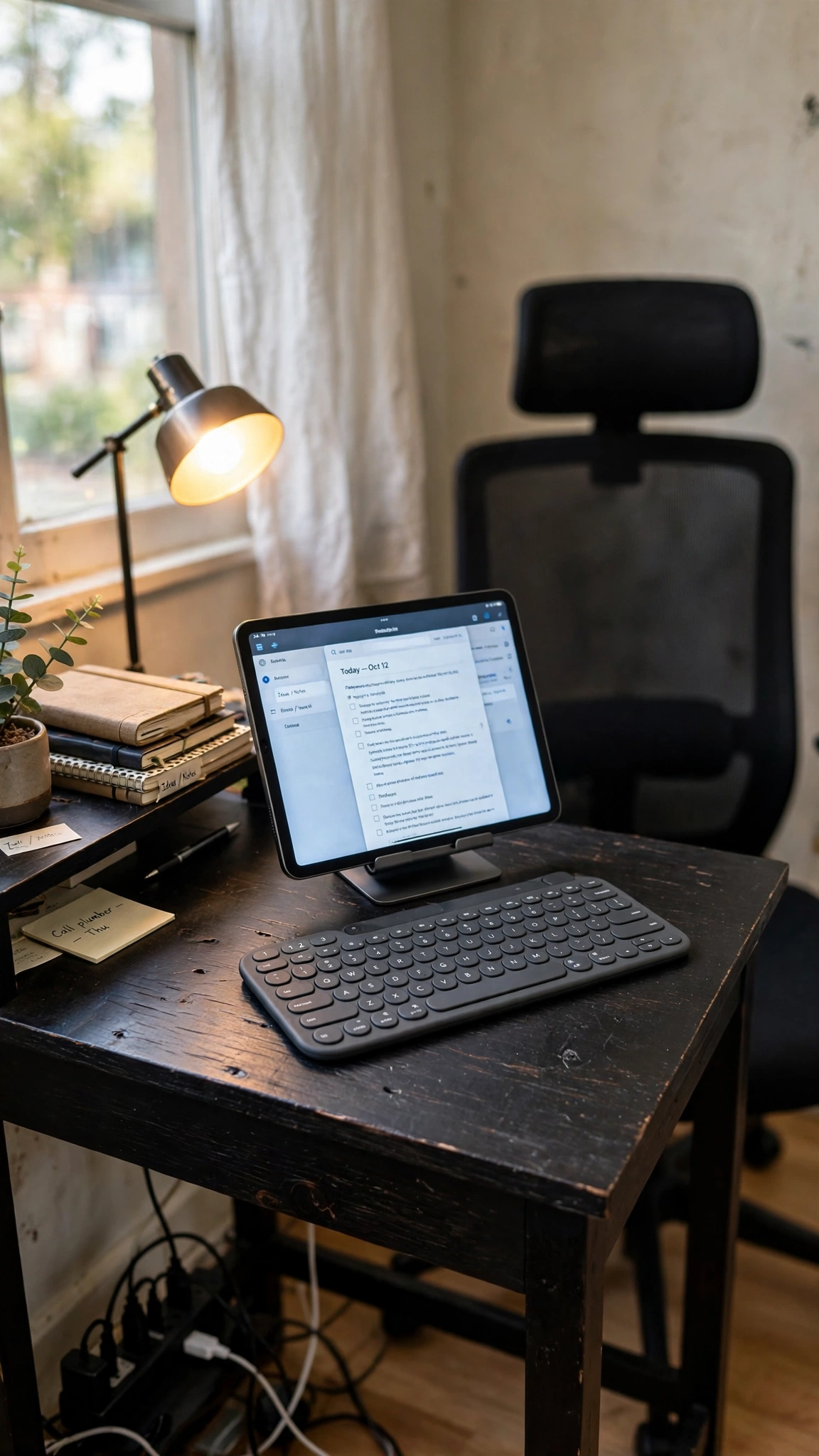
Small desks suit small keyboards, and the Pebble Keys 2 is the smallest full keyboard in this list. Its slim pebble shape pairs with a tablet, a phone, and a laptop. The tablet sits propped on a small stand on a 40 inch black wood desk, the keyboard sits in front of it, and a high-back chair makes the small desk feel like a full office.
What works here: A compact 40 inch black desk, a slim multi-device keyboard, a tablet on a small stand, a high-back office chair, a desk lamp, and a power strip under the desk for the tablet charger and the lamp.
Storage is a small shelf beside the desk, holding notebooks and a charger, because a compact desk has no room for clutter. If your office is a corner or a spare wall, this is the setup to copy, because the tablet and the pebble keyboard take up less room than a laptop, and the high-back chair is the piece that makes it feel like a real desk.
KEY PIECE
Logitech Pebble Keys 2 K380s, Multi-Device Bluetooth Wireless Keyboard with Customizable Shortcuts, Slim and Portable, Easy-Switch for Windows, macOS, iPadOS, Android, Chrome OS, Tonal Graphite
Why this one: A slim portable multi-device Bluetooth keyboard with customizable shortcuts and Easy-Switch for up to three devices.
Worth knowing: It is a slim keyboard, so it suits a compact desk better than a wide one.
COMPLETES THE SETUP
Sweetcrispy Small Computer Desk, 40 Inch, Black Wood
Why this one: A small 40 inch black wood desk that fits a tablet, a slim keyboard, and a chair in a tight corner.
Worth knowing: At 40 inches it is a compact desk, so keep the top to the tablet, the keyboard, and a lamp.
COMPLETES THE SETUP
Amazon Basics Ergonomic High-Back Office Chair, Black
Why this one: A black high-back ergonomic office chair that makes a small desk feel like a full office.
Worth knowing: It is a high-back chair, so check the ceiling and shelf clearance behind the desk.
9. The iClever Slim Keyboard Tablet Desk

AI-generated image
Five drawers change a tablet desk completely, because every cable and notebook finally has a home. The Tribesigns desk holds the tablet on a slim stand, the iClever keyboard in front of it, and five drawers below for files, chargers, and paper, so the desk top stays clear for the work itself. The keyboard recharges over USB-C, so it never needs batteries, and its slim shape leaves room for a notebook beside it.
- Give the top drawer to the charger, so it is always in the same place.
- Use the middle drawers for files and notebooks, not for things you need hourly.
- Keep the bottom drawer for spare cables and the tablet case, so they never clutter the top.
A desk lamp lights the keys, and a power strip with USB ports under the desk feeds the tablet and the keyboard charger. This is the setup to copy if your tablet desk also has to hold paper, because the five drawers are the storage, the stand is the screen, and the slim keyboard is the only thing that ever needs desk space.
KEY PIECE
iClever BK10 Bluetooth Keyboard, Slim, USB-C Rechargeable
Why this one: A slim Bluetooth keyboard that recharges over USB-C, made for tablets and small desks.
Worth knowing: It charges over USB-C, so keep its cable in the top drawer with the tablet charger.
COMPLETES THE SETUP
Tribesigns Computer Desk with 5 Drawers, 47 inches Rustic Brown
Why this one: A 47 inch rustic brown desk with five drawers for files, notebooks, and chargers.
Worth knowing: Five drawers add weight, so check the assembly steps on the listing before ordering.
COMPLETES THE SETUP
Addtam Power Strip 6 AC + 3 USB, 5 Ft, Black
Why this one: A black power strip with six AC outlets and three USB ports on a 5 foot cord, so the tablet and the keyboard charger plug in under the desk.
Worth knowing: A 5 foot cord suits a desk near a wall outlet, so check the outlet distance first.
Frequently asked questions
Can a tablet really replace a laptop in a home office?
It can for writing, email, calls, notes, and browsing, which is most of a home office day, as setups 1, 5, and 9 show. The missing pieces are a stand to hold the tablet upright and a Bluetooth keyboard for typing, not a new computer. If your work needs heavy software that only runs on a laptop, keep the laptop, but for everyday office work a tablet on a stand is a full setup.
What size tablet stand do I need?
Match the stand to your tablet size, not to the desk. A fixed dock like the OMOTON in setup 6 suits tablets up to 12.9 inches, a gooseneck like the Lamicall in setup 2 suits tablets up to 10.5 inches, and an arm like the Pisipi in setup 4 or the KU XIU in setup 7 suits tablets and portable screens up to 15.6 inches. Check the size range on the listing before ordering, and check the fit if your tablet wears a thick case.
Do I need a separate keyboard for a tablet setup?
Yes, if you type for more than a few minutes at a time. The on-screen keyboard covers short notes, but a Bluetooth keyboard like the K380 in setup 3, the Arteck in setup 5, or the iClever in setup 9 turns a tablet into a typing machine. A multi-device keyboard also pairs with your phone, so one keyboard covers both screens.
How do I keep a tablet charged all day at my desk?
Plug the tablet charger into the desk itself, not into a wall outlet across the room. Desks with built-in outlets, like the ones in setups 1, 3, and 6, take the charger straight into the desk top, and a power strip under the desk, like the ones in setups 4 and 9, does the same job on a plain desk. Charge overnight too, so the day starts full.
Can I use a second screen with a tablet setup?
Yes, in two ways. A portable monitor can sit on an arm stand like the ones in setups 4 and 7, which are rated for portable screens as well as tablets, or your phone can act as a small second screen beside the tablet, paired to the same multi-device keyboard as in setups 3 and 8. Either way, the tablet stays the main screen.
What should I buy first if I am starting from nothing?
Start with the stand and the keyboard, then add the desk. The stand and the keyboard decide how the tablet feels every day, and they work on any table you already own, so they are the cheapest first step. Add a desk with built-in power next, like the ones in setups 1 and 6, because the charger is the cable you will plug in most.
Related reading
If you liked these ideas, browse the Home Office Ideas category on desk & glow, or start at the desk & glow home page for more desk setup ideas.
Conclusion
A tablet leads these setups without pretending to be a laptop. A stand or a cradle holds it upright, a Bluetooth keyboard does the typing, and the desk, the chair, the light, the storage, and the power underneath stay practical. Pick the stand that fits your tablet size, check the keyboard pairs with your tablet before you order, and start with the stand and the keyboard, because those are the two pieces that turn a tablet into a desk setup. The best tablet setup is the one where the tablet is the screen you look at all day, not the device you pick up and put down.
