
7 Desk Cable Management Ideas
Seven complete desk setups, each built around one honest cable route, from a clamp-on tray to a slack-first sit-stand drop.
As an Amazon Associate I earn from qualifying purchases. Read our affiliate disclosure for details.
Cable clutter is rarely a shortage of cable products. It is a shortage of a route. A strip on the floor, a charger draped over the desk edge, and a lamp cord crossing the work surface all look messy for the same reason: no one decided where each cable should travel, where it should rest, and where it should stay reachable. This article gives you seven complete desk setups, and each one answers those three questions with a different approach. You get a clamp-on under-desk tray, a floor box, a zippered sleeve, an edge channel, a vertebrae spine, a wall channel, and a slack-first sit-stand route. Every setup is a full scene you can copy whole, with a desk, seating, a screen, light, storage, and power described together, and every setup states its fit conditions plainly. Measure first is the running rule here, because a tray, box, or channel that does not fit your strip or your desk top helps no one.
Contents
1. Under-Desk Tray
2. Corner Box
3. Cable Sleeve Reading Desk
4. Edge Channel
5. Vertebrae Spine
6. Wall Channel Corner
7. Sit-Stand Slack Route
At a Glance
FAQ
Conclusion
At a Glance: The 7 Cable Routes
| Setup | Key Piece | Route in One Line |
|---|---|---|
| 1. Under-Desk Tray | Cinati Under Desk Cable Management Tray | Strip rides in a clamp-on tray under a straight desk. |
| 2. Corner Box | Chouky Cable Management Box, Large, White | Strip and adapters live in a lidded floor box. |
| 3. Cable Sleeve Reading Desk | JOTO Cable Management Sleeve, 4 Pack | Zippered sleeves bundle the drop to the floor. |
| 4. Edge Channel | ENONCI Cable Raceway Kit, Pack 2 | Open-slot channels carry the run along the desk edge. |
| 5. Vertebrae Spine | Vwindesk Vertebrae Cable Management Spine Kit | A segmented spine carries cables from a sit-stand desk to the floor. |
| 6. Wall Channel Corner | ZhiYo Cord Hider Kit, 126 Inch | A paintable wall channel runs the cables to the outlet. |
| 7. Sit-Stand Slack Route | PERFECT POSTURE Mesh Cable Organizer | A mesh organizer plus a slack loop keeps the moving desk safe. |
1. The Under-Desk Tray Workstation

AI-generated image
This is the simplest honest cable setup in the article, and for a straight desk it is often the right one. A plain 47 inch light walnut desk gives you one straight underside with no corner return to work around, your own monitor or laptop sits on top, your own chair tucks underneath, and a small lamp and a notebook or pen cup finish the scene. The cable story lives underneath: a white clamp-on tray holds the power strip and the cable slack, so the only cables that need to appear above the desk are the short lengths to the screen and the lamp. Nothing here pretends the cables vanish. The drop from the tray down to the wall outlet stays visible, and that is fine, because it is short, it is at the back, and it is easy to reach when you need to unplug something.
CABLE ROUTE: Screen and lamp cables drop behind the desk into the tray, the strip rides inside the tray, slack coils in the tray, and one short run leaves the tray for the wall outlet.
MEASURE FIRST: The tray clamps to tops from 0.4 in to 2.4 in thick, and this desk top is 0.98 in, so the clamp fits this desk on those numbers. Your strip must be shorter than the 13.4 in tray, narrower than 4.6 in, and lower than 3.1 in. The strip below meets that, but measure your own strip and adapters first, because a strip with large wall-wart adapters may not sit flat in a 3.1 in high tray.
KEY PIECE
Cinati Under Desk Cable Management Tray, Clamp Mount, White
Why this one: The clamp mount needs no drilling, so it suits a desk you do not want to modify, and the metal tray is fully welded and powder coated with anti-scratch mats on the clamps. The kit includes 1 tray, 4 cable clips, and 6 cable ties.
Worth knowing: At 13.4 in long it is a single small tray, not a long channel. It will not hold a long strip or a pile of bulky adapters side by side, and overpacking it defeats the tidy look and can trap heat around adapters.
Tribesigns Computer Desk, 47 Inch, Light Walnut
Why this one: A plain straight 47 inch desk with a metal frame and adjustable leg pads keeps the tray setup simple, with one straight underside and enough width that the 13.4 in tray uses well under a third of the desk width.
Worth knowing: The open frame has no drawers and no built-in cable pass-through, so anything not in the tray is on show, and the reader still needs the tray discipline this setup teaches.
Belkin 6-Outlet Surge Protector Power Strip, 6 Ft Cord
Why this one: A short, narrow strip that genuinely fits the tray, with surge protection rated at 1080 joules and a 6 ft cord long enough to reach a wall outlet from under the desk without a second extension.
Worth knowing: Only 6 outlets, so this setup outgrows quickly if you add a printer, speakers, and chargers, and the narrow 2 in wide body means bulky adapters can crowd neighbouring outlets.
2. The Corner Box Station
AI-generated image
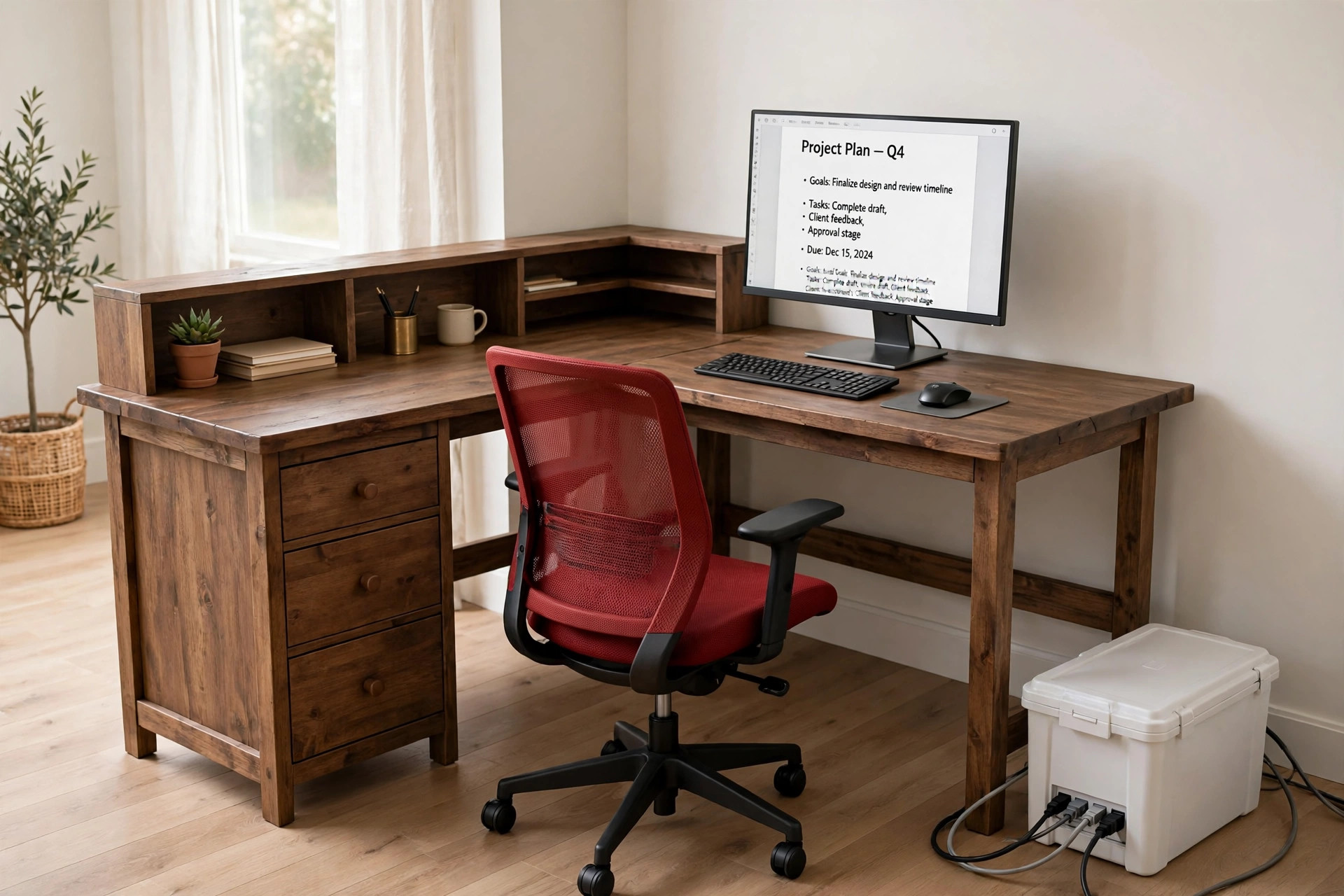
A corner desk changes the cable problem, because the corner is the hardest place to reach and the easiest place to hide a tangle. This setup stops pretending otherwise. A rustic brown L-shaped desk sits in the corner with 3 drawers and shelves for storage and built-in power outlets on the desk itself, a red mid-back mesh chair stays in the corner for longer sessions, and a monitor or laptop sits on the long return with a lamp as a scene element. The cable story is a lidded box on the floor beside the desk leg. The box holds your own strip plus adapters, cables exit the box ends to the desk and to the wall outlet, and those exit runs stay visible. The box sits on the floor in plain sight as a box. It only tidies what is inside it, and that honesty is the point.
KEY PIECE
Chouky Cable Management Box, Large, White
Why this one: A lidded box with ventilation and cable exits at the ends, sized for a full strip plus adapters, with a lid that lifts for access. The title says 2 pack, but this entry uses a single Large White box only, so do not order expecting a second box.
Worth knowing: The box itself is a visible lump on the floor, about 16 in long, and it does nothing for the cables between the box and the desk or the wall. Those runs still need routing and will still be seen.
Simple Deluxe L Shaped Desk with Power Outlets, 47 Inch, Rustic Brown
Why this one: The L shape gives a true corner form with 3 drawers and shelves for storage, and built-in power outlets on the desk itself, so the floor box only has to handle the overflow strip and adapters rather than every device.
Worth knowing: The desk’s own built-in outlets do not remove the need for a floor box, and the L shape makes the corner the hardest place to reach for cable changes, since you will be reaching behind the return to get at the box.
DUMOS Home Office Chair, Mid Back Mesh, Red, Fixed Arms
Why this one: Mesh back with lumbar support, height adjustment, and a rocking mode, in a single chair that fits a corner desk without the bulk of a high-back executive chair.
Worth knowing: The arms are fixed and cannot be adjusted or removed, so if the fixed arm height clashes with the desk height or the L-shaped return, you cannot adjust around it. This is also a mid-back chair, so it gives no head or upper-shoulder support for long leaning-back sessions.
Corner tip: Your strip must be no longer than 16 in, no wider than 6.1 in, and no higher than 5.1 in, using the smaller size figures as the safe limit, and the box needs clear floor space beside the desk leg, not a tight gap behind a drawer unit. Check the fixed arm height against the 29.7 in desk height, and check that the 22.6 in chair width can turn in the corner without hitting the return. The 18.5 in desk depth is on the shallow side, so measure a deep monitor stand against it before you commit.
3. The Cable Sleeve Reading Desk

AI-generated image
This setup is for close work and reading at a white desk against the wall, where the cable run is short but still needs a decision. A 47 inch white desk with shelves and built-in power outlets holds a monitor or laptop and a magnifying lamp for close work, your own chair tucks in, and the shelves take books and small supplies so nothing extra crowds the surface. The cable story is a set of zippered sleeves rather than a wall channel. The sleeves bundle the drop from the desk to the floor, and the run inside a sleeve is bundled, not invisible. One sleeve covers a short drop, and you zip two together for a full desk-to-floor run. Because the sleeves zip, you can open them later, split a cable out through a cut hole at any position, and re-zip without taking the whole run apart.
What goes where:
- Lamp cord and monitor cable together in the first sleeve, since they leave the desk at the same corner.
- Charger cable in a second sleeve, so it can be pulled out on its own when you take the laptop elsewhere.
- Any spare length coiled at the floor end of the sleeve, never stuffed back up behind the desk where it pulls on the plugs.
CABLE ROUTE: Cables leave the desk, enter the zippered sleeve at the back edge, travel bundled to the floor, and exit at the floor end to the outlet. The sleeve itself stays visible as a black fabric run, which suits a reading corner better than a rigid channel.
KEY PIECE
JOTO Cable Management Sleeve, 4 Pack, 19-20 Inches, Black
Why this one: Four zip-up sleeves, each 19-20 in long and 1.2 in in diameter when zipped, holding 8-10 cables per sleeve, and the sleeves zip together to extend the length. The neoprene is flexible, and you can cut holes at any position to split cables out.
Worth knowing: A sleeve bundles cables, it does not hide them inside a wall or a channel. One sleeve covers a short drop only, so a full desk-to-floor run needs two zipped together, and an overfilled sleeve will not zip shut cleanly.
Lufeiya White Desk with Storage Shelves, 47 Inch, White
Why this one: A white 47 inch desk that matches a reading corner, with a monitor stand, storage shelves, and built-in power outlets, so the sleeve only has to carry the lamp and monitor cables down to the outlet rather than every device cable.
Worth knowing: The listing is variant-heavy and the desk carries LED lights and a monitor stand that not every reader wants, and the desk needs 2 people for assembly per the listing. We state no depth or height for this desk here, because the listing rows conflict and the live check must resolve them first.
Brightech LightView PRO Magnifying Desk Lamp, Black
Why this one: A corded LED desk lamp with a 2.25x magnifier, which gives this setup a distinct work style for close work and reading, and a genuine reason for a managed run, since the lamp cord plus the monitor cable are the two runs the sleeve carries.
Worth knowing: The magnifier is a specialist feature. A reader who does not do close work pays for a lens they will not use, and this is a desk lamp, not a room light, so it lights the work area only. The lamp is corded, so its cord is one of the sleeve runs.
4. Channel Run Along the Desk Edge
AI-generated image
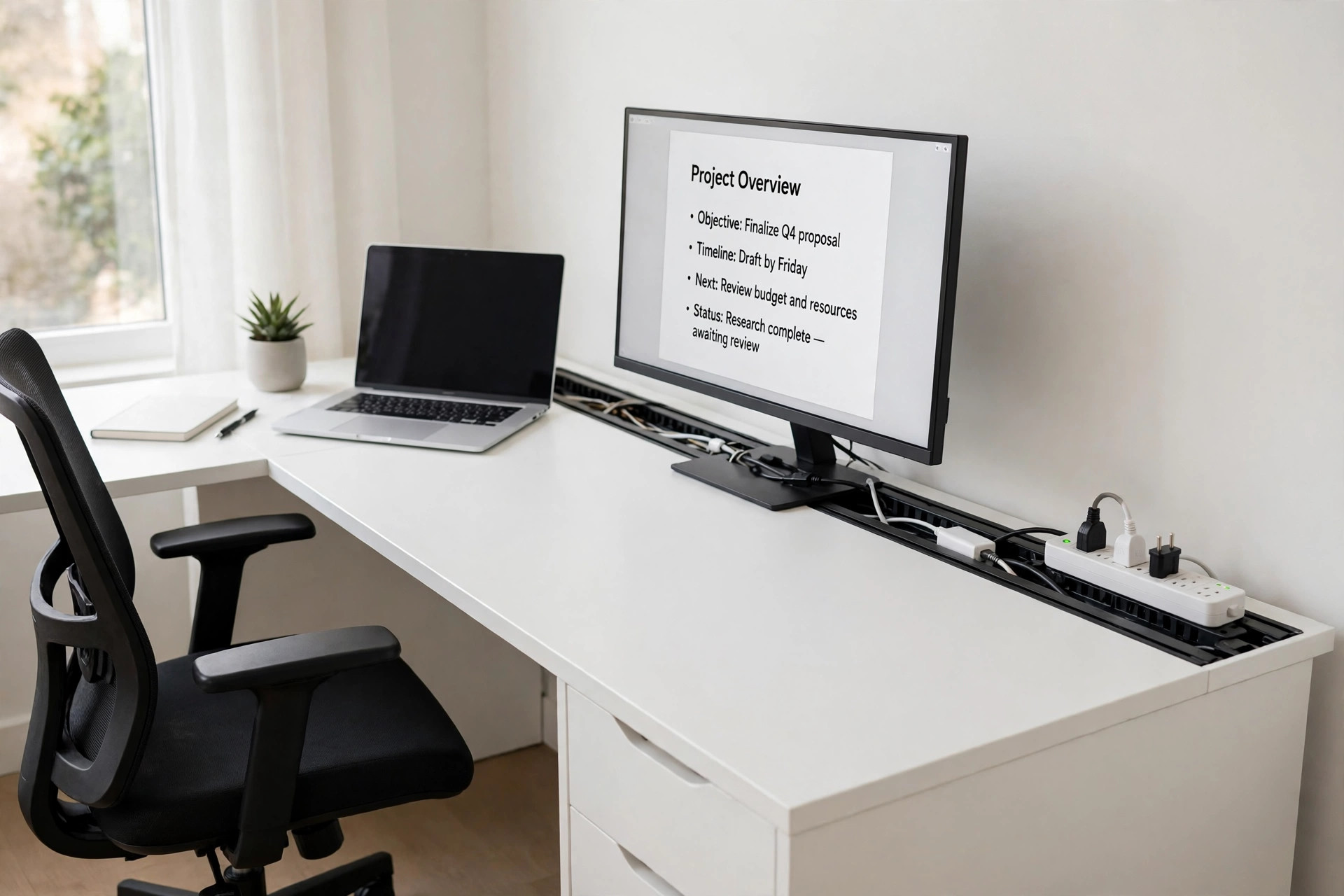
This setup suits a fixed-height corner desk where the devices change often, because its channel opens. A white L-shaped corner desk with reversible shelves and a fabric storage bag holds a laptop plus a monitor on the long run, your own chair and task light complete the scene, and a mountable strip sits at the desk end where the channel run terminates. The channel itself is an open-slot raceway along the back edge, so you can add or remove a cable without taking the whole channel down. The honest limits matter here. One pack gives 30.8 in of channel against a 47 in long side, so it routes the main monitor and laptop run only, not the whole L perimeter. The drop from the channel end down to the strip, and each cable’s short entry into the channel, stay visible and reachable for unplugging.
KEY PIECE
ENONCI Updated Cable Raceway Kit, Pack 2, Black
Why this one: A true open-slot channel rather than loose clips, in 2 pieces at 15.4 in each for 30.8 in total, with both mounting routes supplied: self-adhesive tape and, separately, screws with drywall anchors. Use adhesive on a smooth, clean desk underside or edge, and screws where adhesive cannot be trusted.
Worth knowing: One pack covers only one straight run, not a full L-shaped perimeter, and thick power bricks and adapters will not fit inside a 0.98 in deep channel. Only cables under 0.4 in in diameter belong inside it.
Homieasy Small Computer Corner Desk, L Shaped, 47 Inch, White
Why this one: A genuinely different desk form from a straight desk, with reversible shelves that can go left or right to suit the corner and a fabric storage bag for small storage without adding another cable product.
Worth knowing: Assembly tools are not included, and assembly is a 2-person job, so this is not a quick solo setup. We state the 47 in long side and the 29 in height only, because the listing dimension rows are mixed and the live check must confirm the White variant’s return-side depth first.
VIPWELL 360 Degree Mountable Surge Protector Power Strip, 6 Outlets, White
Why this one: The power anchor for the channel scene, with 6 AC outlets, 4 USB ports (2 USB-C and 2 USB-A), a 6 ft cord, a flat 45-degree plug that sits close behind furniture, and a mountable form that lets it sit at the desk end where the channel run terminates.
Worth knowing: The strip is 12.8 in long, so it needs a clear 13 in run at the desk end or on the wall, and a wide adapter can still crowd a neighbouring outlet despite the 2.0 in spacing. We state no voltage or joule rating for this strip here, because the listing fields conflict and the live check must confirm a US variant first.
MEASURE FIRST: Screw length against the desk top thickness was not stated in the listing content, so do not assume the supplied screws are safe for this top. Use the adhesive on the desk run and keep the screws for a wall run until the live check confirms the screw length suits the top. If the wall outlet is farther than 6 ft from the desk end, this strip alone does not reach it.
5. Cable Spine from Desk to Floor
AI-generated image
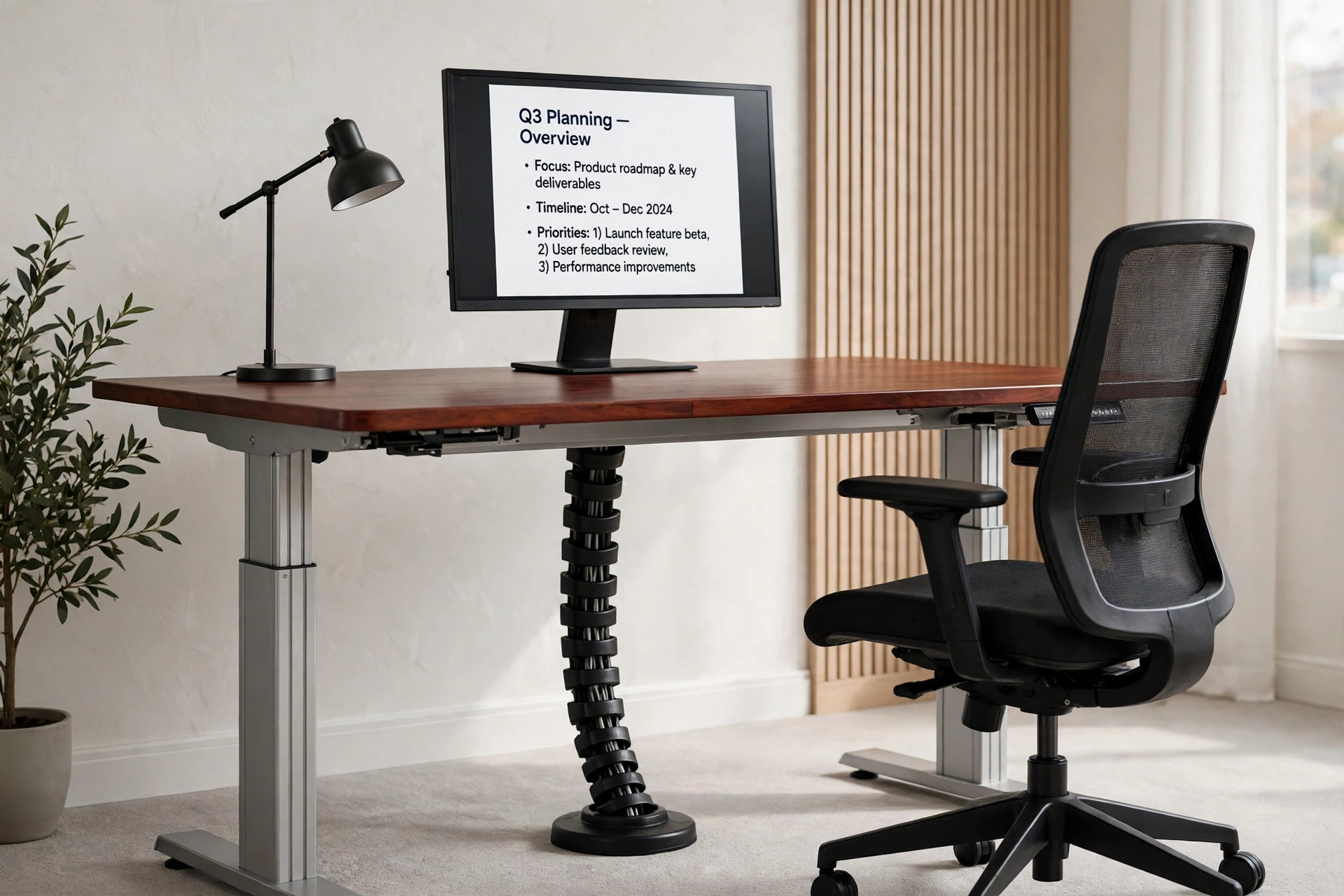
A sit-stand desk breaks every fixed cable route, because the desk moves and the outlet does not. This setup solves that with a vertebrae spine, which is a different mechanism from a tray, a channel, or a sleeve. A straight 48 in by 24 in electric sit-stand desk with a whole-piece mahogany top and a silver frame holds a monitor or laptop and a corded tabletop lamp, your own chair completes the scene, and a black segmented spine hangs from the desk underside to a weighted floor base. The lamp, monitor, and charger cables travel inside the spine’s four channels. The safety rule is the whole setup: size the spine and the cables inside it at the highest desk position, never at sitting height, and leave a service loop under the desk so no cable is pulled taut when the desk rises. At sitting height the spine will flex and bow rather than stand perfectly straight, and that flex is normal, not a fault.
CABLE ROUTE: Cables enter the spine under the desk, travel in separate channels down the segmented spine, and exit at the floor end to the outlet. The spine itself stays visible as a vertical run beside or behind a leg, and the short cable entries at the desk end stay accessible.
KEY PIECE
Vwindesk Vertebrae Cable Management Spine Kit, 50 Inch, Black
Why this one: A true vertebrae spine, not a sleeve. Its modular segments snap together so length can be adjusted, its four channels keep power and data cables in separate slots, and its weighted base anchors the floor end, which is exactly the desk-to-floor problem this setup solves.
Worth knowing: The spine routes cables but provides no covered tray for a power strip or for adapters, so a strip and any power bricks stay outside the spine, under the desk or on the floor, with their short runs visible. No weight capacity is stated for this spine, so do not hang anything from it.
FLEXISPOT Standing Desk, 48 x 24 Inches, Silver Frame, Mahogany Top
Why this one: The sit-stand partner the spine needs, with a whole-piece 48 in by 24 in top that gives a straight, uncluttered run for the spine, dual cable-management holes in the top for cable entry, and electric adjustment.
Worth knowing: The listing variant table mixes several height ranges and weight capacities, so we state no height range or weight capacity for this variant here until the live check ties one row to the Silver Frame plus Mahogany Top variant. The desk also needs assembly, and its cable holes help entry but do not by themselves manage the floor run.
LEPOWER Desk Lamp, Touch Control, 8W, Black, Model LS-H2
Why this one: A simple corded tabletop lamp with touch control, 3 colour modes, and 5 brightness levels, whose slim 8 W form keeps the lamp cable a genuine spine run, unlike a bulky lamp with a separate brick.
Worth knowing: It is corded and tabletop only, so it takes desk space and its cable must be routed into the spine, and it does not clamp to the desk edge. Its 8 W output is also modest for a large desk, so do not present it as a room light.
6. The Wall-Channel Corner Setup
AI-generated image
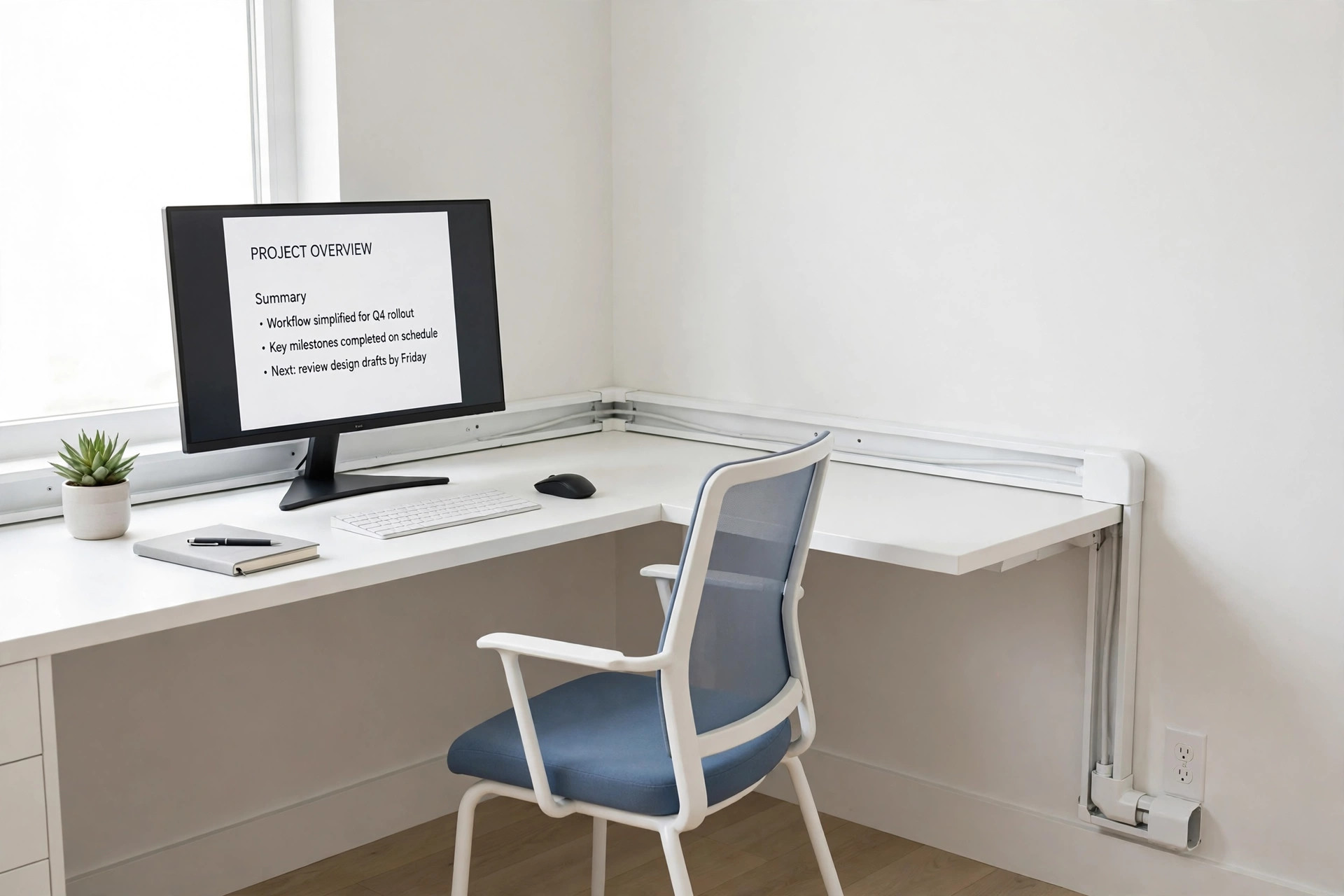
Sometimes the tidiest route is not under the desk at all, but on the wall beside it. This corner setup puts a white 59 inch L-shaped desk with a power outlet, a file drawer, monitor stands, and storage shelves into a corner, with a white-framed mesh chair with a blue seat tucked at the corner. No lamp, monitor, or power strip is boxed in this setup, so the screen, the lamp, and the power feed are described generically: your own screen on the main run, your own lamp, and power from the desk built-in outlets plus the wall outlet at the end of the raceway run. The cable story is a paintable white wall channel that leaves the desk, turns the corner with an elbow connector, and runs along the wall to the outlet. The channel stays visible on the wall by design, and it must stay openable, so you can add or swap a cable later. Painted to match the wall it blends in, but it never becomes invisible, and that is an honest trade for a run that never crosses the floor.
What goes where:
- Screen and lamp cables enter the wall channel at the desk edge, where the channel starts.
- The desk built-in outlet module still needs its own wall feed, so that feed is part of the raceway run, not an extra cable.
- Thick power bricks stay outside the channel or under the desk, because they may not fit the 0.75 in channel height.
KEY PIECE
ZhiYo Cord Hider Kit, 126 Inch, White
Why this one: 126 inches total in 8 pieces of 15.7 inches each, with straight, elbow, and tee connectors, so one kit covers a desk-to-outlet run plus a corner turn without a second purchase. The PVC channel is cuttable and paintable, and at 1.54 in wide by 0.75 in high it fits typical monitor, laptop, and lamp cables.
Worth knowing: The channel is a visible white strip on the wall, and even painted it is not invisible, and the lid must stay accessible to add or swap a cable, so it cannot be plastered over or buried behind fixed furniture. Thick power bricks may not fit inside the 0.75 in height.
Furologee White 59 Inch L Shaped Desk with Power Outlet, Reversible
Why this one: A white L-shaped desk that gives the wall raceway two wall runs to follow, with a power outlet, a file drawer, monitor stands, and storage shelves, so the corner itself supplies part of the power and storage story.
Worth knowing: We use the title size of 59 in only, because the listing dimensions block is garbled and must never be quoted, and the live check must confirm the White power-outlet variant’s own details, since the comparison table mixes sizes and drawer configurations. This desk also needs a real corner; on a straight wall the return leg wastes space and changes the raceway plan.
amseatec Ergonomic Mesh Office Chair, White Frame, Blue Seat
Why this one: Breathable mesh back with a thick seat cushion, flip-up arms that help the chair tuck at a corner desk, a swivel and rolling base, and a 300 lb capacity, in a white frame with a blue seat that keeps the corner setup light rather than all black.
Worth knowing: This is a mid-back chair with no headrest mentioned in the listing evidence, so it is not the choice for a reader who wants head and neck support for long sessions. At 27.4 in wide it is also broad for a tight corner, so clearance around the desk return must be checked, and we do not claim the arms tuck under the desk.
MEASURE FIRST: Measure the wall run from the desk edge to the outlet, including the corner turn, before cutting. 126 in is the total kit length, not a promise that it reaches a far outlet. The tape supplied is strong, but the listing does not promise damage-free removal, so never treat this as a risk-free choice for a rented wall. Test a small piece first and accept possible paint pull on removal, or use the screws with anchors and landlord permission where required.
7. The Sit-Stand Spine Setup
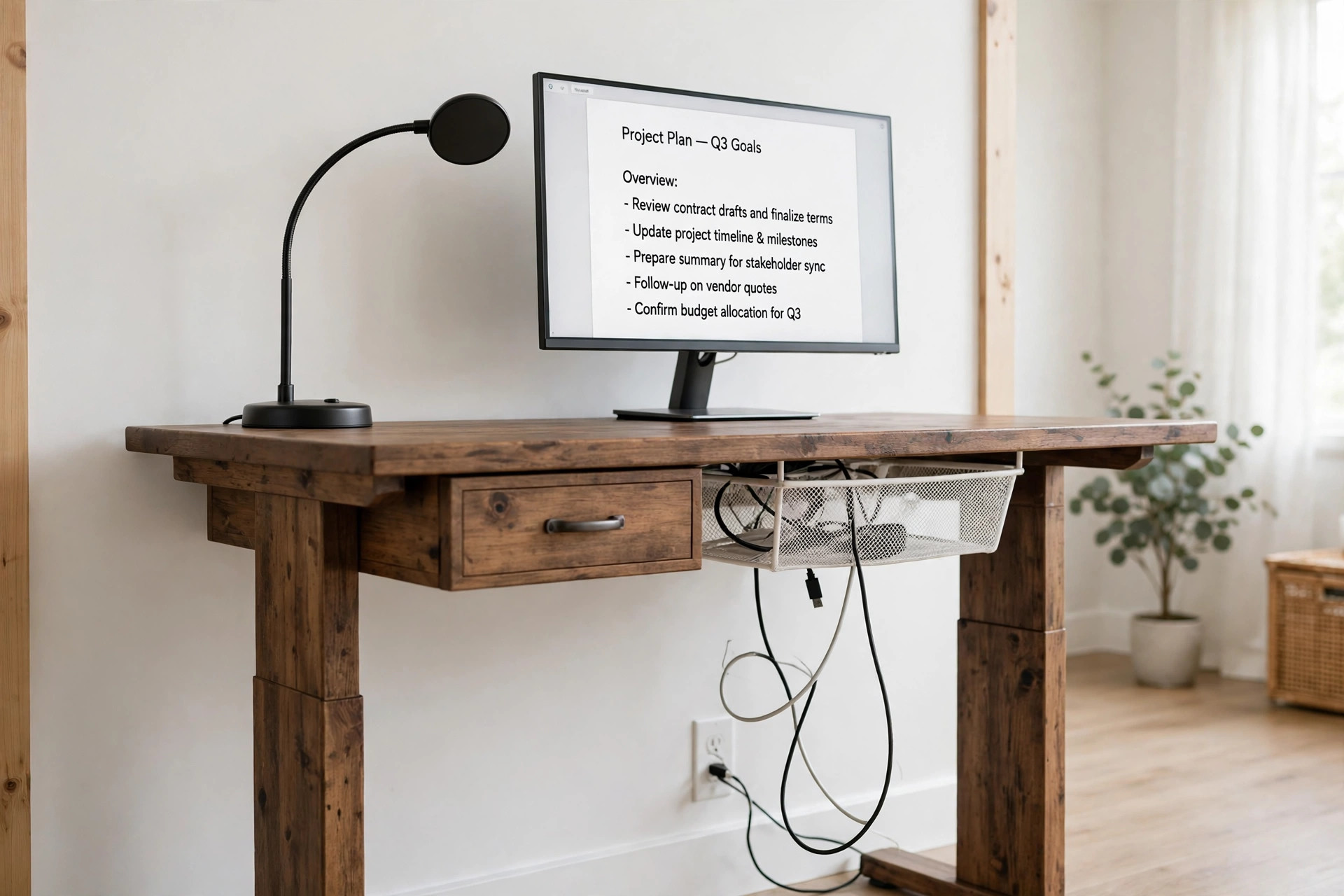
AI-generated image
This is the setup that keeps a sit-stand desk safe, and it is deliberately different from the vertebrae spine in setup 5. Where setup 5 uses a rigid segmented spine as the tidy vertical channel, this setup uses a flexible mesh organizer under the desk plus a slack loop as the safety device. A 55 inch by 28 inch electric standing desk in rustic brown, travelling from 28 in to 45 in, holds a monitor or laptop and a gooseneck task lamp on the moving top, so the lamp cable travels with the desk, and storage comes from the desk drawer plus its under-desk tray. No chair is boxed in this setup, so seating for seated periods is described generically. The rule to follow is simple and non-negotiable: leave at least the full 17 in of travel as extra cable in the drop from the organizer to the floor outlet, test the desk through its full up and down range before tightening any strap, and never cinch the drop taut or fix it to the wall at a single height. The spine flexes, the slack protects, and neither replaces the other.
KEY PIECE
PERFECT POSTURE Mesh Cable Organizer, 37.4 Inch, White
Why this one: A flexible mesh organizer with adjustable straps and a segmented, flexible spine section, explicitly described as moving with a sit-stand desk and preventing snags, rather than a rigid tray that would fight the desk movement. It gathers power and charging cables into one flexible sleeve under the desk and keeps cords off the floor along the desk itself.
Worth knowing: This is a routing sleeve, not a storage tray. It does not provide a wide shelf for a bulky power strip and large adapters, so a thick strip must be checked for fit inside the mesh or mounted separately. It is also a screw-mounted product with screw-in Z-brackets, so do not choose it on a no-drill promise.
SHW Electric Height Adjustable Standing Desk with Drawer, 55 x 28 Inch, Rustic Brown
Why this one: A true electric height-adjustable desk, 55 in wide by 28 in deep, travelling from 28 in to 45 in, with a memory preset controller, a drawer with adjustable compartments, a built-in grommet, a cable management clamp and tray, hooks, and rounded corners.
Worth knowing: The 110 lb capacity is modest for a standing desk, so a heavy multi-monitor plus desktop plus printer load must be weighed before ordering. The listing also says the back is unfinished, so the desk looks best with its back to a wall, not floating in the middle of a room.
Reliable UberLight Flex 4200TL Task Light, Round Base, Black
Why this one: A 26.5 in flexible gooseneck with a 270 degree rotational head and 9 settings across 3 colour temperatures and 3 brightness levels, on a round base that sits on the moving desk top without a clamp, so its cable is a natural second cable for the spine and slack story.
Worth knowing: USB-powered only, with no mains adapter stated as included in the listing evidence, so it needs a USB port or adapter the reader supplies, and its cable adds one more drop cable that must carry slack. It is a task light, not a room light, and its base diameter is not stated, so we claim no footprint figure for it.
CABLE ROUTE: Cables gather in the mesh organizer under the moving top, travel with the desk, and drop to the floor outlet as a visible slack loop carrying at least 17 in of extra cable. Test full travel before tightening any strap, and never zip-tie the floor drop taut.
Frequently Asked Questions
Where should the power strip go in a tidy desk setup?
Put it where you can reach it without crawling, and where its cables have a short route. Under a straight desk that means riding in a tray, beside a corner desk that means inside a floor box with the lid accessible, and at a channel desk that means at the desk end where the channel terminates. A strip buried behind fixed furniture or inside a drawer you cannot open is not tidy, it is just hidden until the day you need it.
Can one cable kit hide every cable on a desk?
No, and any setup that promises that is overselling. A tray holds what fits inside it, a box only tidies what is inside it, and a channel only covers its own run. The drop to the outlet, the short entries into a channel, and the floor drop on a sit-stand desk all stay visible by design, and the honest setups in this article say so. The goal is a route that looks deliberate, not a claim that cables disappear.
What is the sit-stand slack rule?
Size every cable and every spine at the highest desk position, never at sitting height, and leave at least the full travel distance as extra cable in the floor drop. On a desk travelling from 28 in to 45 in, that means at least 17 in of extra cable in the drop. Test the desk through its full up and down range with cables loosely routed before you tighten any strap, and never cinch the drop taut or fix it to the wall at a single height.
Do I need to drill to manage my cables?
Not always, but it depends on the product. A clamp-on tray needs no drilling, and an adhesive channel avoids screws on a smooth, clean surface. A screw-in under-desk organizer puts holes in the desk underside, and a wall channel may need screws with anchors on textured or uneven walls. Read the mounting method for the exact product you buy, and do not accept a no-drill promise for a product whose own specification says screw-in.
How do I pick a tray or box that fits my strip?
Measure the strip including its plug ends and any bulky adapters, then compare those numbers with the tray or box interior, using the smaller size figures where the listing gives two. A strip that fits on length alone can still fail on height, especially in a shallow tray, and a wide adapter can crowd neighbouring outlets even when the strip itself fits. If the numbers are close, choose the larger tray or box, not the tighter one.
What do I do when a cable run must stay visible?
Route it deliberately and keep it reachable. A channel or sleeve gives a visible run a clean edge, a spine gives a vertical drop a tidy form, and a slack loop on a sit-stand desk is a safety feature, not a mess. Keep entries and exits accessible for unplugging, keep power bricks out of channels they do not fit, and never force a cover shut over an overfull channel.
Conclusion
Pick the route that matches your desk, not the product that looks tidiest in a photo. A straight desk earns a tray, a corner desk earns a box, a reading desk earns a sleeve, a fixed corner desk earns an edge channel, and a sit-stand desk earns either a vertebrae spine or a slack-first mesh route, with the slack rule doing the real safety work in both cases. Measure your strip, your desk top, and your wall run before you order, test a sit-stand desk through its full travel before you tighten anything, and leave the runs that must stay visible in a form you can reach. Do that, and the cables stop being clutter and start being part of the setup. For more desk ideas, browse the Home Office Ideas category, and for a different kind of mood lighting, see 15 LED Gaming Room Ideas That Set the Perfect Mood and 15 Dark Gaming Setup Ideas for a Moody Battlestation.
